My Dystopian Robot Girlfriend Mods: Best Mods and Easy Install Guide (2026)
Looking for My Dystopian Robot Girlfriend mods? Factorial Omega: My Dystopian Robot Girlfriend lists modding support as an official feature, and the developer, Incontinent Cell, posts approved mods in a dedicated Discord channel. This guide explains where to find MDRG mods safely, how to install a code mod with MelonLoader, and how to recover when an update breaks something.
Quick answer: get mods from the official Discord’s #mod-releases channel or the mod author’s own page (for example GitHub). Code mods such as MoanMod need MelonLoader 0.7.3, then the mod files go into the game’s Mods folder. Always back up your saves first, and match the mod to your game version (current build: 0.97.x).
Where to Download My Dystopian Robot Girlfriend Mods
- Official Discord, #mod-releases: the developer’s itch.io page states that developer-approved mods are posted there. This is the safest source.
- Author pages: some modders publish on GitHub with source code and release notes, which lets you check version compatibility.
- itch.io community board: the game’s forum has mod threads, but posts get deleted or go stale, so check dates.
Avoid re-uploads on random file hosts, “mod packs” bundled with .exe installers, and anything promising unlocked paid content. These are the usual source of malware, and paid cheats are now tied to the developer’s Patreon and SubscribeStar tiers anyway (see our My Dystopian Robot Girlfriend cheat codes page).
Types of MDRG Mods
| Type | Examples | Risk to saves |
|---|---|---|
| Audio and expression | MoanMod (moans, breathing, facial reactions) | Low |
| Cosmetic | Clothing textures, colours, accessories | Low |
| Gameplay | Economy, stats or progression changes | Medium to high |
| Utility | Loaders and settings menus (MelonLoader, ModSettingsMenu) | Low, but required by others |
The game itself has hooks for modders: its debug features include a “reload textures of mod items” option, which shows custom items are expected. Debug access is given to modders and translators rather than regular players.

How to Install My Dystopian Robot Girlfriend Mods (Windows)
The steps below follow the MoanMod readme, which is a good template for any MelonLoader mod.
- Back up your saves (see our My Dystopian Robot Girlfriend save location guide).
- Download and install the PC build of the game from the Patreon page.
- Install MelonLoader 0.7.3. In the installer choose Add game manually, select
My Dystopian Robot Girlfriend.exe, and leave nightly builds turned off. - Launch the game once and close it. This creates the
Modsfolder. - Extract the mod’s zip directly into
Mods. Do not end up withMods/Mods/. - Launch again and check the mod loaded (for MoanMod, open its page in the Mod Settings Menu).
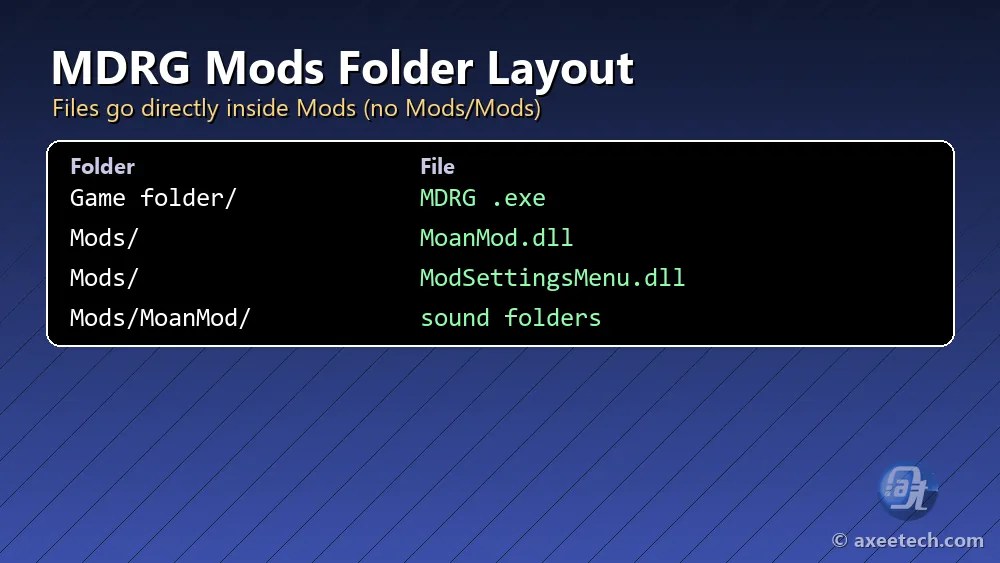
Correct folder layout
Game folder / My Dystopian Robot Girlfriend.exeGame folder / Mods / MoanMod.dllGame folder / Mods / ModSettingsMenu.dllGame folder / Mods / MoanMod / (cumming, while, breath folders)
Keep the game path in plain English letters. MoanMod’s author notes that non-Latin characters in the install path stop it from loading.
MoanMod: The Most Popular MDRG Mod
MoanMod by IkariDevGIT adds moaning and breathing audio that reacts to pleasure changes and to Jun’s lust and sympathy, plus matching facial expressions. It stays silent until Jun reaches Advanced AI. It needs ModSettingsMenu.dll by Echo for its options page, supports MDRG 0.97 and later only (0.95 and below are not supported), and works natively on Windows. Linux via Proton and macOS are untested; Android, iOS and the browser build are not supported. You can add your own sounds as 8- or 16-bit PCM .wav files, but the cumming/while folder must contain at least one file.
Mods on Android, Mac and the Browser Version
Code mods built on MelonLoader are Windows-first. The browser (HTML5) build cannot load them at all, and Android support depends entirely on the individual mod. If you play on Android, export your save first with Main Menu, Load, To File, so a broken install never costs you progress.
Mods Not Working? Quick Fixes
- Game updated, mod stopped: check the mod’s “compatible versions” note and wait for an update. Remove the mod to play in the meantime.
- Nothing loads: make sure files are not nested in Mods/Mods and that MelonLoader is the version the mod asks for.
- Crash on start: remove the newest mod first, then add mods back one at a time.
- Missing textures: compare your folder structure with the mod’s readme.
- Save behaves oddly: restore the backup you made before installing.
Mods are optional. If you just want to progress faster, the complete MDRG guide and the My Dystopian Robot Girlfriend websites list cover money, unlocks and secrets without touching game files.
Best Practices for My Dystopian Robot Girlfriend Mods
The safest way to use My Dystopian Robot Girlfriend mods is to treat every update as a reset. Incontinent Cell ships updates often (0.97.12 is the current hotfix), and each one can change the code that mods hook into. Before you update, note which My Dystopian Robot Girlfriend mods you run, back up the save folder, and check each mod page for a version note.
- Install one mod at a time and test the feature it changes, not just the title screen.
- Install loaders and libraries first, then content, then cosmetics.
- Keep a short text file listing each mod, its version and the date you installed it.
- Remove gameplay mods from an important save only after checking the author’s uninstall notes.
Following these rules keeps My Dystopian Robot Girlfriend mods from costing you hours of progress. If a mod is abandoned, it is usually better to drop it than to keep the game on an old build.
Mods vs Cheats
Mods change files on your PC. Cheats in MDRG are now a paid perk: the Robot GF Enjoyer tier ($6.99 a month) adds money options, and the Robot GF Connoisseur tier ($14.99 a month) adds item spawning, colour changes and more. If you only want money, playing the stock market well is free.
Frequently Asked Questions
Does My Dystopian Robot Girlfriend support mods?
Yes. Modding support is listed as a feature on the official itch.io page, and approved mods are posted in the Discord #mod-releases channel.
What do I need to install MDRG mods?
Most code mods need MelonLoader (MoanMod asks for 0.7.3). Install it on the game’s .exe, run the game once, then extract the mod into the Mods folder.
Do mods work on the browser version?
No. The browser build cannot load code mods. Use the Windows download.
Will mods break my save?
Cosmetic and audio mods rarely do, but gameplay mods can. Back up your save folder before installing anything.
Is Factorial Omega the same game as MDRG?
Yes. The full title is !Ω Factorial Omega: My Dystopian Robot Girlfriend, so mods for one are mods for the other.

Axee Davies is the founder of AxeeTech, publishing gaming guides, codes, and Windows how-tos since March 2013. A tech enthusiast for 13+ years — starting with smartphones and Android rooting — he now runs a site that puts out a new guide every day for Roblox players, traders, and Windows users. More about AxeeTech
More Games You May Like
 Summertime Saga Cheats: Cheat Mode, $999,999 Money and Maxed Stats
 Summertime Saga Characters: Full Cast List by Group (2026)
 Summertime Saga Minigames: Every Minigame, What It Unlocks and Tips
 Summertime Saga Pregnancy Guide: Chances, Pills and All 14 Characters
 Summertime Saga Save File Location: Windows, Mac, Linux and Android
 Summertime Saga Stats Guide: How to Max Strength, Dexterity, Charisma and Intelligence
 Summertime Saga Achievements: All 48 Achievements and How to Unlock Them
 Deep Vault 69 Cheat Codes: Tester Console Codes for Every Version