All Pokémon Pokopia Mystery Gift Codes (October 2026): Every Active Code, Rewards & How To Redeem
Updated October 13, 2026: we confirmed 2 working Pokémon Pokopia Mystery Gift codes this week (1 new). The newest distribution is the D1VE1NTHESEA code, released, which unlocks a full resort furniture set and replaces the Chansey Plant code that expired on October 7. The Ditto Rug needs no code: claim it with “Get via Internet” at a Pokémon Center PC before January 31, 2027. You’re in the right place. This page tracks every active Pokémon Pokopia Mystery Gift Code in one place, updated the moment new codes drop. Whether you just picked up the game on Nintendo Switch 2 or you’ve been playing since launch day, you won’t need to hunt across a dozen sites to find your free items. There is more on the way, too: the Expansion Pass rollout has begun, with Part 1 “Bubbly Basin” releasing and adding an underwater city, new Pokémon, new furniture, and new food. Part 2 arrives in late 2026, and Part 3 follows in 2027.
All active Mystery Gift codes for Pokémon Pokopia are listed in the tables below, complete with expiry dates, reward details, and step-by-step redemption instructions. Pokémon Pokopia continues The Pokémon Company’s decades-long tradition of rewarding players with limited-time freebies — and even in a life-sim, those free decorations and food items are absolutely worth grabbing. Let’s get straight into it.
Get through our Codes Section to check other game codes, including the latest ones like: Be Dino, Dragon Ball Legends, and more.

What Is a Mystery Gift in Pokémon Pokopia?
If you’re new to the Pokémon franchise, here’s the quick rundown. A Mystery Gift is a free in-game item distributed directly by The Pokémon Company, delivered to your game through one of two methods:
- Internet distribution — No code needed. Connect online, select Get via Internet, and the game automatically downloads any active gifts you’re eligible for.
- Serial codes — A 16-character password that you type into the game manually. Some codes are unique to individual players (such as pre-order or event campaign codes), while others are released publicly and usable by anyone.
In Pokémon Pokopia, Mystery Gifts focus on furniture, decorations, food items, and crafting materials — the kinds of rewards that help you build better habitats and make your islands more welcoming for your Pokémon. It’s worth noting that everything distributed via Mystery Gift is also obtainable through regular gameplay. These are convenient shortcuts, not exclusive locked content. Think of them as The Pokémon Company saying thanks for playing.
Now that you know what to expect, here are all the codes and gifts currently available.
Also Read: How many Pokemons in Pokopia?
All Active Pokémon Pokopia Mystery Gift Codes
| Code / Method | Reward | Items Included | How to Get |
|---|---|---|---|
| D1VE1NTHESEA | Resort Furniture Set (expires February 29, 2028) | Resort Sofa, Resort Table, Resort Hammock, Resort Stool, Twisted Potted Plant | Get with Code/Password at any Pokémon Center PC (distributed October 6, 2026) |
| Get via Internet (no code required) | Ditto Rug (valid until January 31, 2027, 23:59 UTC) | 1× Ditto Rug (decorative floor item) | Early purchase / pre-order bonus — select Get via Internet at any Pokémon Center PC |
This table is updated regularly. Bookmark this page and check back for new codes — The Pokémon Company typically releases new codes during events, livestreams, and promotional campaigns. New gifts are added here as soon as they go live.
All Expired Pokémon Pokopia Mystery Gift Codes
All expired codes are archived here so you can confirm whether a code you’ve found online is still valid before attempting to redeem it.
| Code / Method | Reward | Items Included | How to Get | Expired On |
|---|---|---|---|---|
| P0K0P1AGARDENS: Chansey Plant (expired October 7, 2026; zeros not O’s, a one not an I). The Chansey Plant is still obtainable in-game at the Withered Wasteland PC Shop. | ||||
With the codes in hand, here’s exactly how to get them into your game.
How to Redeem Mystery Gift Codes in Pokémon Pokopia
Before You Start — Prerequisites
Before you can redeem any Mystery Gift, make sure you meet all four of these requirements:
- Nintendo Switch 2 connected to the internet — Wi-Fi or wired connection required.
- Nintendo Account linked to your user profile — Without this, the internet-based gifts will not load.
- NO Nintendo Switch Online subscription required — A free Nintendo Account is all you need. You don’t need to pay for NSO.
- Approximately 30 minutes of gameplay completed — You must reach and access the Pokémon Center PC in Withered Wastelands before the Mystery Gift menu becomes available. Some players take up to 1.5 hours, depending on their pace through the early tutorial.
Method 1: How to Claim a Mystery Gift via the Internet (No Code Needed)
Use this method to claim the Ditto Rug pre-order bonus.

- Approach any Pokémon Center PC in the game and press A to interact.
- Select Get Items from the main menu.
- Click on Mystery Gifts.
- Select Get via Internet.
- The game will connect and automatically download any gifts you’re eligible for. Your reward appears on screen — enjoy your freebie!
Method 2: How to Claim a Mystery Gift with a Code or Password
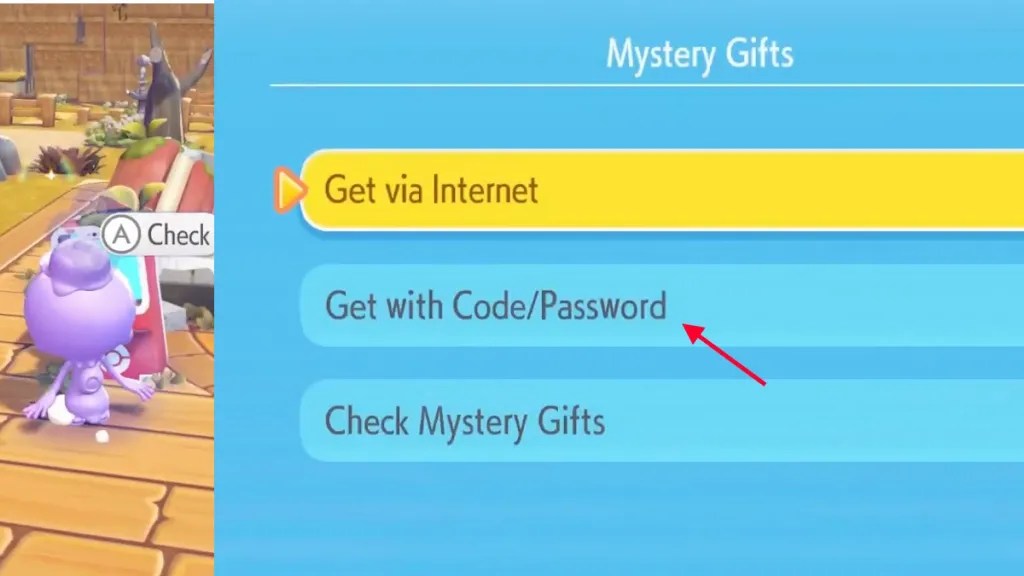
Use this method for serial codes like the Pokopia Release Commemorative Gift Set.
- Approach any Pokémon Center PC and press A to interact.
- Select Get Items from the main menu.
- Click on Mystery Gifts.
- Select Get with Code/Password.
- Use the on-screen keyboard to type your 16-character code exactly as written — codes are case-sensitive.
- Press A to confirm and receive your reward.
To check which Mystery Gifts you’ve already claimed, select the Check Mystery Gifts option from the same menu. It’s a handy way to avoid confusion if you’re not sure whether you’ve already redeemed something.
Wondering what exactly you’ll find in your inventory once you’ve redeemed? Here’s a closer look at each reward.
Pokémon Pokopia Mystery Gift Rewards — What Do You Actually Get?
Ditto Rug
The Ditto Rug is a decorative floor item featuring Ditto’s iconic, endearingly blobby face. You can place it inside your Pokémon habitats or home areas to add a splash of personality to your builds. It’s a small but charming décor piece that fits the warm, cozy atmosphere Pokémon Pokopia is known for. If you miss the Mystery Gift window, don’t panic — the Ditto Rug is also craftable through regular gameplay, so you can still get one without the pre-order bonus. That said, why pass up a free one?
To find the Ditto Rug after redeeming it, check your in-game inventory or item storage. It will have been deposited there automatically as soon as the download completes.
Pokopia Release Commemorative Gift Set
This set contains three types of items:
- 2× Leppa Berries — A restorative fruit used in Pokémon care, helpful for keeping your Pokémon comfortable and well-fed.
- 2× Fresh Carrots — A food item your Pokémon enjoy, contributing to their comfort and environment levels.
- 2× Beans — A crafting material used in building and decorating habitats.
Like the Ditto Rug, all three of these items are available through regular gameplay — the Mystery Gift is simply a head start. They’ll appear in your inventory automatically once redeemed.
Now that you know what’s currently available, let’s look at what’s coming next.
When Will New Pokémon Pokopia Mystery Gift Codes Be Released?
Pokémon Pokopia launched on March 5, 2026, which means it’s still very early days for the game’s distribution calendar. At launch, The Pokémon Company kept things simple with two gifts — but based on their history with other Pokémon titles, that’s about to change significantly over the coming months.
New Mystery Gift codes in Pokémon games have historically been tied to:
- Pokémon Presents livestream events — Major broadcasts where The Pokémon Company announces news and often drops surprise code distributions simultaneously.
- In-game seasonal events — Pokopia is already running its first limited-time event (the More Spores for Hoppip event, March 9–24). Future events like this are prime opportunities for tied Mystery Gift codes.
- Pokémon Day celebrations (February 27 annually) — Historically one of the biggest days for free distributions across all Pokémon games.
- Tournament sponsorships and retail partnerships — Codes distributed via partner stores or Pokémon Championship Series events.
- Social media campaigns — The Commemorative Gift Set itself was tied to an X campaign, so expect more social media-based distributions.
To make sure you never miss a code, follow @Pokemon on X/Bluesky, bookmark this page (it’s updated as soon as codes go live), and enable notifications from the official Pokémon channels. The best codes tend to have short windows, so acting quickly matters.
If a code you found online isn’t behaving the way you’d expect, the next section covers every common issue and how to fix it.
Troubleshooting — Why Isn’t My Pokémon Pokopia Mystery Gift Code Working?
This is the section no other guide has — and it’s the one you actually need when something goes wrong. Here are the six most common issues and how to resolve each one.
1. “Code Not Recognized.”
Mystery Gift codes are case-sensitive. Even a single wrong character will cause a rejection. Copy and paste the code directly from a trusted source wherever possible. If you’re typing manually, pay close attention to common confusion pairs: the number 0 versus the letter O, and the number 1 versus the letter I or lowercase l. Take your time — one mistype is all it takes.
2. “Mystery Gifts Option Isn’t Appearing.”
You haven’t unlocked it yet. You need to progress approximately 30 minutes into the game and reach the Pokémon Center PC in Withered Wastelands. Until you’ve done that, the Mystery Gifts option won’t be visible in the PC menu at all. Keep playing through the opening section, and it will unlock naturally.
3. “Code Already Redeemed.”
Each code can only be used once per Nintendo Account. If you’re seeing this message, you’ve likely already claimed the gift in a previous session. Head to your in-game inventory and check your item storage — the reward should already be waiting for you there.
4. “Get via Internet Isn’t Showing Any Gifts.”
Two things to check: first, confirm your Nintendo Switch 2 has an active internet connection. Second, verify that your user profile is properly linked to a Nintendo Account. Both are required for internet-based distributions to work. If both are confirmed and the issue persists, try restarting the game and attempting the redemption again.
5. “Code Expired.”
All Mystery Gift codes have a redemption deadline. Double-check the expiry date in the active codes table above. If the code’s window has passed, unfortunately, there’s no way to redeem it — expired codes cannot be reactivated. This is exactly why acting quickly on new codes matters.
6. “I’m Not Seeing the Ditto Rug via Internet”
The Ditto Rug is specifically an early purchase bonus — it’s only available to players who purchased Pokémon Pokopia before the early purchase deadline. If you bought the game after that window closed, the Ditto Rug will not appear in your Get via Internet queue. You can still obtain it through regular gameplay crafting instead.
With troubleshooting covered, here are quick answers to the questions players ask most often.
Frequently Asked Questions — Pokémon Pokopia Mystery Gift Codes
Q: Do I need Nintendo Switch Online to get Mystery Gifts in Pokémon Pokopia?
A: No. You need a Nintendo Account linked to your Switch profile and an active internet connection, but you do NOT need a paid Nintendo Switch Online subscription. Mystery Gifts are free to claim as long as your Nintendo Account is set up and you’re connected online.
Q: Can I use Mystery Gift codes on Nintendo Switch 1 via GameShare?
A: Pokémon Pokopia is a Nintendo Switch 2 exclusive, but the GameShare feature allows Switch 1 owners to play a limited version of the game through a nearby Switch 2. If you’re playing via GameShare, check whether your session grants full access to the Pokémon Center PC menu — internet-based gifts typically require a Nintendo Account to be active on the device, which may limit availability for GameShare sessions on Switch 1.
Q: How many times can I use a Mystery Gift code?
A: Each Mystery Gift code can only be redeemed once per Nintendo Account. Even universal codes released publicly — the kind available to all players — can only be used once per account. Once redeemed, the code is locked to that account and cannot be used again, even on a different Switch console tied to the same account.
Q: Where do Mystery Gift items go after I redeem them?
A: Items are automatically added to your in-game inventory or item storage the moment redemption completes. The game will show you a confirmation screen telling you exactly what you received. After that, head back into gameplay and check your item box or inventory screen to find your new items ready to use.
Q: Can I share my Commemorative Gift Set code with a friend?
A: No. The Pokopia Release Commemorative Gift Set code is unique to each player who received it through The Pokémon Company’s X campaign. The code was delivered as a personal reply tied to your X account activity. It is account-specific and cannot be transferred, gifted, or shared with anyone else. If a friend wants one, they would have needed to participate in the campaign before the March 5, 2026, deadline.
Q: How long does it take to unlock the Mystery Gift option?
A: Most players unlock it after roughly 30 minutes of gameplay — specifically, once you reach and access the Pokémon Center PC in Withered Wastelands for the first time. If you’re taking your time exploring or completing every objective, it may take closer to 1.5 hours. Either way, it unlocks naturally through story progression, so just keep playing.
Q: What’s the difference between “Get via Internet” and “Get with Code/Password”?
A: Get via Internet automatically scans for any active event distributions that The Pokémon Company has pushed out to all eligible players — no code entry required. Get with Code/Password is for manual redemption, where you type in a specific serial code or password to claim a targeted gift. Think of internet gifts as automatic vouchers and code gifts as redeemable coupons — both result in free items, just through different delivery mechanisms.
Q: Will Pokémon Pokopia Mystery Gift codes ever include actual Pokémon?
A: That’s unlikely, given the nature of the game. Pokémon Pokopia is a life-sim — you befriend and care for Pokémon rather than catching them in the traditional sense. Mystery Gifts in Pokopia are designed around the game’s core loop, so expect rewards like furniture, food items, decorations, and crafting materials rather than Pokémon distributions. As the game expands with updates and events, new reward categories may emerge, but playable Pokémon through Mystery Gifts isn’t a design direction that fits Pokopia’s format.
Understanding where Mystery Gifts came from adds useful context — and helps explain why they’re such a big deal every time a new one drops.
A Brief History of Mystery Gifts in the Pokémon Franchise
Mystery Gifts have been part of the Pokémon series since Generation 3, first appearing in FireRed and LeafGreen. Back then, they were primarily used to distribute rare, event-exclusive Pokémon — think mythical Pokémon like Jirachi or Deoxys tied to movie promotions, only available for a narrow window and impossible to obtain any other way.
Over the years, the system has evolved considerably. By the time of Sword and Shield, Mystery Gift codes were being released through Pokémon Presents broadcasts and retail partnerships. Scarlet and Violet expanded this further, with social media campaigns on X, QR code distributions at events, and codes embedded in official promotional materials. Legends Z-A continued that approach, weaving Mystery Gifts into both community events and competitive tournament structures.
Pokémon Pokopia continues this tradition while adapting it to a completely different game format. Instead of Pokémon, the distributions focus on furniture, food, and decorative items that fit the life-sim experience. It’s the same community-building spirit — The Pokémon Company rewarding engaged players — applied to a new kind of Pokémon game. For longtime fans, seeing Mystery Gifts return in Pokopia is a small but meaningful sign that the team is treating this spin-off with the same care as the mainline series.
Conclusion
Here’s the quick summary: right now in October 2026, there are two active Pokémon Pokopia Mystery Gift codes: the D1VE1NTHESEA serial code for a resort furniture set (available until February 29, 2028) and the Ditto Rug (via internet, available until January 31, 2027). Both are easy to claim once you’ve unlocked the Pokémon Center PC in Withered Wastelands, which takes about 30 minutes of gameplay. No Nintendo Switch Online subscription required, just a free Nintendo Account and an internet connection.
This page is updated every time a new code is confirmed or an existing one expires, so bookmark it now. Know of a code we missed? Drop it in the comments below, and we’ll verify and add it to our list!
More game codes: Be Dino Codes, Dragon Ball Legends Codes, How Many Pokemons in Pokopia

Axee Davies is the founder of AxeeTech, publishing gaming guides, codes, and Windows how-tos since March 2013. A tech enthusiast for 13+ years — starting with smartphones and Android rooting — he now runs a site that puts out a new guide every day for Roblox players, traders, and Windows users. More about AxeeTech
More Codes You May Like
 Blood Strike Codes (October 2026): Working Redeem Codes & How to Use Them
 Pokemon UNITE Codes (October 2026): Working Gift Codes & How to Redeem
 Watcher of Realms Codes (October 2026): How to Redeem & Where to Find Them
 Brawlhalla Codes (October 2026): Skins, Titles & How to Redeem
 Lords Mobile Codes (October 2026): Working Redeem Codes & How to Use Them
 BreakDoor Codes (October 2026)- All working Codes
 Berry Avenue Codes: Get Free Bangs, Cute Face, Denim Shorts, And More
 Four Elements Trainer Cheats 2026: Sets Free Your money, Respect Level, And More