Is Outlast Trials Crossplay in 2026? Complete Cross-Platform Guide
The Outlast Trials throws you into the terrifying experiments of the Murkoff Corporation, challenging you to survive brutal scenarios as a Reagent in a twisted Cold War program. For the first time in the franchise’s history, developer Red Barrels has crafted an experience you don’t have to face alone, supporting four-player co-op. But if you’re planning to navigate those dimly lit corridors with friends, a critical question arises: can you team up regardless of what platform everyone owns?
Whether your squad is scattered across PC, PlayStation, or Xbox, knowing the crossplay capabilities is essential before you coordinate your escape from the Sinyala Facility. This guide provides the definitive answer on crossplay for The Outlast Trials in 2026, covering exactly which platforms can connect, how to use the in-game friend code system to add players from other systems, and whether your hard-earned progression follows you if you switch platforms. Bookmark this page and check back after major updates—we keep this information current.
Also check more crossplay articles: Is Reanimal Crossplay | Will GTA 6 Be Crossplay | Is Castle Crashers Crossplay
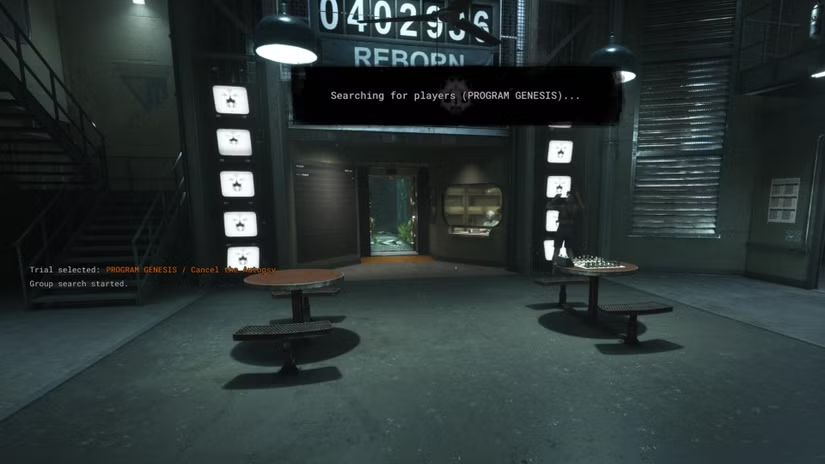
Is Outlast Trials Crossplay? The Definitive Answer
Yes. The Outlast Trials supports full crossplay across every platform where the game is available. This is not a limited feature or an afterthought. Red Barrels built crossplay into the core multiplayer experience from the beginning.
The Timeline
The game launched in Early Access on PC in May 2023. During this period, crossplay existed between Steam and Epic Games Store players. When the full 1.0 release arrived in March 2024 alongside PlayStation and Xbox versions, crossplay expanded to include every console.
Platform Compatibility Table
| Platform | Crossplay Support |
|---|---|
| PC (Steam) | Full crossplay with all platforms |
| PC (Epic Games Store) | Full crossplay with all platforms |
| PlayStation 5 | Full crossplay with all platforms |
| PlayStation 4 | Full crossplay with all platforms |
| Xbox Series X | Full crossplay with all platforms |
| Xbox Series S | Full crossplay with all platforms |
| Xbox One | Full crossplay with all platforms |
| Nintendo Switch | Not available |
| Mobile Devices | Not available |
What Crossplay Covers
Every game mode supports crossplay equally:
- Standard Trials: The main story missions, where you complete objectives while avoiding enemies
- MK-Challenges: Difficulty-enhanced versions of trials with modified parameters
- Weekly Therapy: Rotating challenges with unique modifiers that change every week
- Limited-Time Events: Seasonal and promotional events that appear throughout the year
- Practice Mode: Solo practice sessions (technically not multiplayer, but available on all platforms)
How Matchmaking Works
The game does not separate players by platform. When you queue for matchmaking, you enter a pool that includes everyone playing on every platform. The matchmaking system considers:
- Your selected trial or mode
- Difficulty preferences
- Geographic region (approximate, based on connection)
- Available players at that moment
You will see platform icons next to player names in lobbies. A small monitor icon indicates PC players. The PlayStation logo appears for PS4 and PS5 users. The Xbox logo appears for Xbox One, Series S, and Series X players. This visual cue helps you know who you are playing with.
Unique Insight #1: The game actually prioritizes crossplay connections in matchmaking. If you leave crossplay enabled, you will find matches faster than players who disable it, especially on less populated platforms like PlayStation 4 or Xbox One in certain regions.
How Crossplay Works in Outlast Trials
Understanding that crossplay works is one thing. Understanding how to actually play with your friends across platforms is what matters. This section walks through everything you need to know.
The Friend Code System
Outlast Trials does not use your platform friends lists for crossplay. You cannot simply invite a PlayStation friend through your Xbox dashboard. Instead, the game has its own internal friend system built specifically for cross-platform connections.
Why this matters: This system works identically on every platform. Whether you play on PC, PS5, or Xbox, the process is exactly the same.

Step-by-Step Guide to Adding Cross-Platform Friends:
- Launch The Outlast Trials and enter the Sleep Room lobby. This is your hub area where you customize your character, select trials, and form parties.
- Open the Friends menu. On PC, press the F key (default). On PlayStation, press the touchpad. On Xbox, press the View button. You can also navigate to the Social tab from the main menu.
- Select “Add Friend” or the plus icon. This opens the friend code interface.
- Find your unique friend code. It displays prominently at the top of this screen. It looks something like “ABCD-1234-EFGH.” Share this code with friends however you normally communicate, Discord, text message, carrier pigeon.
- Enter your friend’s code. Type or paste it exactly as provided. Friend codes are case-sensitive and include hyphens. A single wrong letter means the code will not work.
- Wait for confirmation. Once entered correctly, the friend request sends automatically. Your friend receives a notification in their game.
- Accept the request. Your friend must accept the request from their Friends menu. After acceptance, they appear in your friends list regardless of their platform.
- You are now connected. You can see when they are online, what they are playing, and invite them to your party.
Inviting Friends to Your Party
Once friends are in your list, inviting them takes seconds.
- In the Sleep Room lobby, look at the party slots on the left side of your screen. Empty slots show a plus icon.
- Click the plus icon next to an empty player silhouette. This opens your friends list.
- Select the friend you want to invite from the list. They receive an invitation immediately.
- Your friend accepts the invitation. They spawn in your Sleep Room lobby.
- Repeat for up to 4 total players. The party leader is the one who invited everyone.
- The party leader selects a trial, adjusts difficulty if desired, and launches when everyone is ready.

Important Note: The party system works identically regardless of who is the party leader. A PlayStation player can lead a party with Xbox and PC members. An Xbox player can lead a party with PlayStation and PC members. There is no platform hierarchy.
Matchmaking with Random Players
If your regular friends are offline or you want to meet new players, matchmaking works seamlessly across platforms.
- From the Sleep Room, select “Quick Play” or “Group Finder” from the trial selection screen.
- Choose your preferred trial or select random.
- Select difficulty preferences if desired.
- The system searches for available players across all platforms.
- Once enough players are found, you load into the trial together.
Pro Tip: If you have specific preferences (like voice chat or experienced players), mention them in the pre-game lobby. The game does not have preference filters beyond difficulty.
Disabling Crossplay (Optional)
Some players prefer to match only with their own platform. Maybe you want consistent performance. Maybe you had a bad experience. Maybe you just prefer console-only lobbies. The option exists.
How to disable crossplay:
- Open the main menu during gameplay or from the title screen.
- Navigate to Settings.
- Select the “Game Options” tab.
- Scroll down to “Cross-Network Play” or “Crossplay.”
- Toggle the setting to Off.
- Confirm your choice.
What happens after disabling:
- Matchmaking only searches for players on your specific platform
- You cannot join friends on other platforms
- Friends on other platforms cannot join you
- Your friends list still shows cross-platform friends, but you cannot play together

Warning: Disabling crossplay may significantly increase matchmaking times, especially on platforms with smaller player populations like PlayStation 4 or Xbox One. Late-night sessions might take several minutes to find matches.
Cross-Progression and Cross-Save Status
Here is the disappointing news for players who own multiple platforms or plan to switch systems.
Cross-progression is NOT supported in The Outlast Trials.
This means:
- Progress on PC stays on PC
- Progress on PlayStation stays on PlayStation
- Progress on Xbox stays on Xbox
- You cannot transfer saves between platforms
- You cannot link accounts to share progress
What This Means Practically
If you start playing on PlayStation 5 and later buy a gaming PC, you start over. All your character progression, unlocked rigs, completed trials, earned prescriptions, and cosmetic items remain locked to your PlayStation account.
If you play on Xbox Series X but want to continue on Xbox One when traveling, that works. The Xbox ecosystem shares saves through Xbox Live. But moving to PlayStation or PC means resetting to zero.
Practical Advice
Choose your primary platform carefully before investing significant time. Consider:
- Where do your friends play? (Crossplay solves this, but saves matter)
- Which platform do you prefer for controller vs. keyboard?
- Do you plan to upgrade platforms during this console generation?
- Is portability important? (Xbox Cloud Gaming offers some flexibility within the Xbox ecosystem)
If you think there is any chance you might switch platforms later, prepare to restart. The game is enjoyable enough that replaying trials with new strategies can be its own reward, but the time investment matters.
Solo vs. Co-op – The Crossplay Experience
The Outlast Trials works differently depending on whether you play alone or with friends. Understanding these differences helps you set expectations.
Solo Play Considerations
Playing alone is entirely possible. The game scales enemy behavior and trial objectives for solo players.
What solo play feels like:
- Enemies focus entirely on you. There is no one else to draw aggro or create distractions.
- No backup for revives. If you go down, the trial ends.
- Every sound and footstep belongs to something hunting you.
- The atmosphere is more oppressive and genuinely terrifying.
- Some trials become significantly harder without teammates to divide enemy attention.
Who solo play suits:
- Traditional Outlast fans who played previous games alone
- Players seeking maximum horror immersion
- Those with unpredictable schedules who cannot coordinate with friends
- Players who enjoy mastering challenges through individual skill
Co-op Crossplay Benefits
Playing with friends transforms the experience.
What co-op feels like:
- Shared objectives require teamwork. One player distracts while another completes objectives.
- Revive mechanics keep teams alive through mistakes.
- More chaotic and sometimes less scary, but often more fun.
- Coordination becomes essential at higher difficulties.
- Hilarious moments emerge from miscommunication and panic.
Expert Tip: Playing with friends across platforms creates memorable moments, but expect the horror factor to decrease slightly as you coordinate and communicate. The tradeoff is worth it for most players.
Difficulty Considerations
| Player Count | Difficulty Level | Recommended For |
|---|---|---|
| Solo | Hardest | Experienced players, horror purists |
| 2 Players | Balanced | Most players, a good introduction |
| 3 Players | Easier | Casual sessions, farming rewards |
| 4 Players | Easiest | Social gaming, completing tough trials |
Troubleshooting Crossplay Issues
Crossplay usually works seamlessly, but problems can arise. Here are the most common issues and how to fix them.
Issue 1: Cannot find a friend’s Invite
Symptoms: Your friend sent an invite, but you never received it. Or you sent one, and they never got it.
Solutions:
- Verify game versions match. All players must be on the same version. Check for pending updates on each platform.
- Restart the game. Sometimes the invite system gets stuck. A fresh launch often fixes it.
- Check friend codes. Did you enter the code correctly? Friend codes are case-sensitive and include hyphens. One wrong character breaks the connection.
- Try direct joining. From the Friends menu, select your friend’s name and choose “Join Game” instead of waiting for an invite.
- Reboot your router. Rarely, network address translation (NAT) issues block peer-to-peer connections. A router restart can resolve this.
Crossplay Lag or High Ping
Symptoms: Rubber-banding, delayed actions, teleporting enemies, or disconnections.
Solutions:
- Use wired Ethernet. Wi-Fi introduces latency and packet loss. A wired connection improves stability significantly.
- Close bandwidth-heavy applications. Streaming video, large downloads, or cloud backups compete for bandwidth.
- Play during off-peak hours. Evenings and weekends have higher network congestion.
- Consider a gaming VPN or network optimizer. Services that optimize routing can reduce latency for cross-region play.
- Check your distance to friends. Playing with someone on another continent introduces unavoidable latency. The game handles it reasonably well, but some lag is inevitable.
Cannot hear Voice Chat
Symptoms: You can see your friend playing, but cannot hear them, or they cannot hear you.
Solutions:
- Check in-game voice chat settings. Verify chat is enabled, and volume is turned up.
- Check platform voice chat settings. PlayStation, Xbox, and PC each have system-level voice chat permissions.
- Test with the platform party chat. Use PlayStation Party, Xbox Party, or Discord to confirm your microphone and headphones work.
- Restart voice chat. Sometimes toggling voice chat off and on in settings resets the connection.
- Check crossplay voice permissions. Some platforms restrict cross-network voice chat by default.
Matchmaking Takes Too Long
Symptoms: You wait several minutes without finding players.
Solutions:
- Enable crossplay. If crossplay is disabled, you only match with your platform. Smaller platforms have smaller player pools.
- Play during peak hours. Matchmaking works fastest when most players are online.
- Check server status. Rarely, Red Barrels servers experience issues. Check official social media for announcements.
- Expand your selection. Choosing specific trials limits the pool. Quick Play casts a wider net.
Regional Restrictions
Symptoms: You only match with players from certain regions, or experience high latency consistently.
Context: The Outlast Trials does not have official regional locks, but matchmaking prioritizes low-latency connections. This often means matching with geographically close players.
Solutions:
- Accept regional matching. Playing with nearby players provides the best experience.
- Use friend codes for specific cross-region play. Direct connections to friends work regardless of region, though latency may be higher.
- Consider off-peak hours for your region. Playing when your region sleeps might match you with other regions.
Technical Performance and Crossplay Impact
Crossplay itself does not significantly impact game performance. The game runs locally on your device regardless of who you play with. Network conditions matter more.
Platform Performance Specifications
| Platform | Typical Performance | Load Times |
|---|---|---|
| High-end PC (RTX 3080+) | 60+ FPS at 4K, max settings | Very fast (SSD required) |
| Mid-range PC (RTX 2060) | 60 FPS at 1080p, high settings | Fast |
| PlayStation 5 | 60 FPS, high settings | Fast |
| Xbox Series X | 60 FPS, high settings | Fast |
| Xbox Series S | 60 FPS, medium settings | Fast |
| PlayStation 4 Pro | 30-45 FPS, medium settings | Moderate |
| PlayStation 4 | 30 FPS, low settings | Slower |
| Xbox One X | 30-45 FPS, medium settings | Moderate |
| Xbox One | 30 FPS, low settings | Slower |
Does Crossplay Affect Performance?
Crossplay does not directly impact frame rates or graphical quality. Those depend entirely on your hardware.
Crossplay does affect:
- Matchmaking speed: Enabled crossplay = faster matches
- Latency: Playing with distant friends = higher ping
- Connection stability: Peer-to-peer elements can be affected by any player’s connection quality
The game uses a hybrid networking model. Some functions run on dedicated servers, while others use peer-to-peer connections between players. This means one player’s poor connection can sometimes affect everyone in the party.
Frequently Asked Questions
Is Outlast Trials crossplay between PC and Xbox?
Yes, PC players can play with Xbox One, Xbox Series X, and Xbox Series S players. Use the friend code system to connect across platforms.
Can PS5 and PC play Outlast Trials together?
Absolutely. PlayStation 5 and PC crossplay works seamlessly through the game’s internal friend system. No special settings required.
Does Outlast Trials have cross-progression?
No, cross-progression is not supported. Your saved data stays on the platform where you started. Xbox ecosystem shares saves between Xbox consoles, but PC and PlayStation do not transfer.
How many players can play Outlast Trials together?
Up to 4 players can form a party for co-op trials. This is the maximum party size regardless of platform mix.
Do I need a separate account for crossplay?
No, the game uses its own internal friend system. You do not need Ubisoft Connect, EA accounts, or any cross-platform service. Your platform account (Steam, Epic, PlayStation Network, Xbox Live) logs you in, and the friend system works on top of that.
Can I disable crossplay in Outlast Trials?
Yes, you can turn off crossplay in the settings menu under Game Options. Disabling restricts matchmaking to your platform only and prevents playing with friends on other platforms.
Is Outlast Trials crossplay between Steam and Epic?
Yes, both PC storefronts are fully crossplay compatible. Steam players can play with Epic Games Store players without any additional steps.
Does Outlast Trials support split-screen?
No, split-screen is not available. Each player needs their own device, their own copy of the game, and an internet connection.
Will my progress transfer if I switch from PC to PS5?
No, you must start over on the new platform. There is no save transfer mechanism between different platform families.
Is Outlast Trials crossplay in 2026?
Yes, crossplay remains fully supported in 2026 across all platforms. Red Barrels has maintained crossplay functionality through all updates and shows no signs of removing it.
Can I play with friends of different generations?
Yes. PS5 plays with PS4. Xbox Series X|S plays with Xbox One. Cross-generation play works within the same platform family automatically.
Do I need PlayStation Plus or Xbox Game Pass Core for crossplay?
Yes. Console players need their platform’s online subscription service (PlayStation Plus or Xbox Game Pass Core) to play online, including crossplay. PC players do not need subscriptions.

Future of Crossplay in Outlast Trials
Red Barrels has established a strong track record of post-launch support. The Outlast Trials has received regular updates, including new trials, events, and quality-of-life improvements.
What Players Want
The community consistently requests:
- Cross-progression: This is the most requested feature. Players want to switch platforms without losing progress.
- More voice chat options: Better cross-platform voice integration.
- Platform-specific optimizations: Continued performance improvements for all systems.
What Red Barrels Has Said
As of 2026, there are no announced plans to add cross-progression. The developer has focused on:
- New content and trials
- Bug fixes and stability
- Event programming
- Platform parity
Reasonable Expectations
Crossplay itself is stable and unlikely to change. It works well and has since launch.
Cross-progression is technically possible; many games offer it. Whether Red Barrels implements it depends on:
- Engineering resources required
- Player demand (make your voice heard)
- Business considerations (multiple game sales per player)
If you want cross-progression, let Red Barrels know through official channels. Developer attention follows community feedback.

Axee Davies is the founder of AxeeTech, publishing gaming guides, codes, and Windows how-tos since March 2013. A tech enthusiast for 13+ years — starting with smartphones and Android rooting — he now runs a site that puts out a new guide every day for Roblox players, traders, and Windows users. More about AxeeTech
More Games You May Like
 Is ARK: Survival Evolved Cross Platform? Crossplay Guide (2026)
 Is Path of Exile 2 Cross Platform? Crossplay Guide (2026)
 PS5 and PC Crossplay Games: Full List (2026)
 Is Castle Crashers Crossplay? The Short Answer is Frustrating, but Let’s Break It Down
 Will GTA 6 Be Crossplay?, no matter what box they’re gaming on.
 Is Reanimal Crossplay? The Short Answer
 Is Gang Beasts Crossplay? (The Short Answer)
 Is Insurgency Sandstorm Crossplay? (Yes, and Here’s How It Finally Works)