Minecraft Color Codes Symbols: All Chat codes, Motd Codes, Text Formatting Codes
If you are looking for the Minecraft Color Codes Symbols, then you are at the right site. We have gathered every Minecraft color code, chat code, MOTD code, hex code, and text formatting code, verified on Java Edition 26.3 and Bedrock Edition 26.52 with the latest Wilderness Bound game drop, all in one place.
Here is our all-in-one Tool for Minecraft Color Codes Generator. You can easily copy the color codes and even copy and paste the formatted text and chat in the game.
Minecraft Color Codes Symbols Generator
A complete list of all Minecraft color codes and format codes for use in chat, signs, books, and server MOTDs. Click on a code to copy it.
Color Codes
| Preview | Description | Chat Code | MOTD Code | Hex |
|---|
Formatting Codes
| Preview | Description | Chat Code | MOTD Code |
|---|
How to Use Color Codes
In-Game (Chat, Signs, Books)
To use color codes in-game, you need to use the section sign (§), which can be tricky to type. On some systems, you can copy-paste it. In Minecraft books, you can type `&` followed by the code, and it will convert to the § symbol when the book is signed.
Example for a sign:
§4Warning! §1Keep Out!
Server MOTD (server.properties)
For the Message of the Day in your `server.properties` file, you must use the MOTD code format (e.g., `\u00A74`).
Example:
motd=\u00A7aMy \u00A7bAwesome \u00A7cServer!
Combining Codes
You can combine formatting codes with a color code. The color code must come first. To reset formatting, use `&r`.
Example for bold red text:
&4&lImportant Message
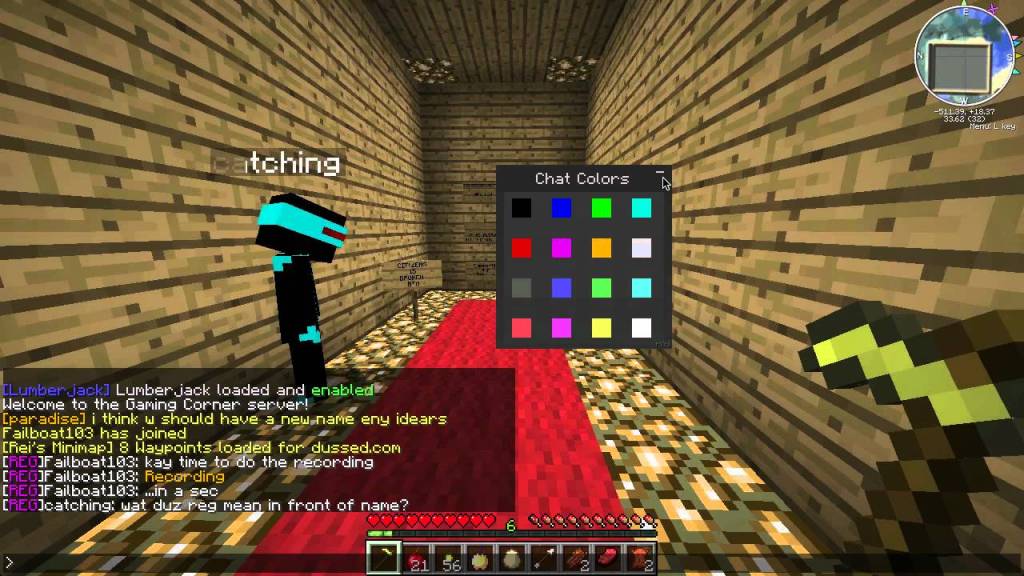
Minecraft Color Codes, Symbols, Text Formatting Tips and Tricks:
Minecraft color codes are special formatting symbols that change text appearance in chat, signs, books, and server MOTDs. Using the section sign (§) or ampersand (&), these codes apply 16 colors and 6 text styles (bold, italic, etc.), enabling players to create visually striking messages.
You can copy and paste the Minecraft Color codes following the usage technique, and pro tips for maximum impact.
Do Read: Minecraft Lewdcrat Mod
Advanced Usage Techniques for Minecraft Color Codes Symbol
- Sign Hierarchies: Use color tiers for organization:
§4[URGENT](Dark Red) for warnings§e[INFO](Yellow) for announcements§a[GUIDE](Green) for tips
- Book Chapter Formatting: In written books, combine codes for readability:text§lCHAPTER 1§r\n§7The Cave Secrets§r Bolds chapter titles while using gray (§7) for subtitles.
- MOTD Branding: Server owners use gradient effects in MOTD:text\u00A76W\u00A7ee\u00A6lc\u00A7ao\u00A7dm\u00A7be\u00A79! Creates a rainbow “Welcome!” message.
- Obfuscation Tactics: Use
§kfor puzzle maps:§kX§r marks the spotreveals “X” only when hovered.
Do Checkout: More Game Codes here
Pro Tips for Optimal Minecraft Color Symbol Use
- Accessibility Pairings:
- High contrast:
§4(Dark Red) on§f(White) - Avoid:
§0(Black) on§8(Dark Gray)
- High contrast:
- Resource Pack Integration:
- Customize colors by editing
pack.mcmetafiles - Override default hex values (e.g., change
§cred to#FF0000)
- Customize colors by editing
- Command Block Automation: text/tellraw @p [“”,{“text”:”[ALERT] “, “color”: “red”},{“text”: “Creeper nearby!”,”color”: “gold”}]
Common Mistakes & Fixes for Minecrafts Color Symbols
| Mistake | Solution |
|---|---|
MOTD codes are showing as \u00A74 | Add §r before line breaks |
MOTD codes showing as \u00A74 | §lBold§r bleeding into the next line |
| Colors not working in books | Use & instead of § before signing |
| Obfuscation lag | Limit to 3 words per message |
Check Out: Minecraft PlayBattleSquare Guide | Minecraft 1.22 End Update Confirmed List
FAQs: Minecraft Color Codes Symbols for Chat
Can I use color codes in item names?
Yes! In anvils, use § + code (e.g., §dDiamond Sword). Requires operator permissions or mods in survival.
Why do some codes appear as “?” in chat?
Outdated resource packs. Update packs or use default Minecraft fonts. §k always shows as ? until hovered.
How to type the § symbol on keyboards?
- Windows: Alt + 2 + 1 (numpad)
- Mac: Option + 6
- Consoles: Copy/paste from signs
Do color codes work in server plugins?
Yes! Plugins like EssentialsX convert & to § automatically. For LuckPerms prefixes, use &c[Admin].
Can I create custom colors?
Only via resource packs. Edit textures/font/ascii.png , but requires hexadecimal editing expertise.
Why do MOTD colors break after server updates?
Version changes (e.g., 1.16 to 1.20) reset unicode handling. Reapply codes in server.properties.
Statistics: Minecraft Color Code Usage
- Most Popular Codes:
- §a (Green): 34% of all chat messages
- §c (Red): 28% (warnings/errors)
- §d (Pink): 22% (player shops)
- Formatting Frequency:
- Bold (§l): 41%
- Underline (§n): 12%
- Obfuscated (§k): 8%
Source: 2026 Minecraft Chat Analytics Report
Key Takeaways for Minecraft Symbols
- Color Psychology: Warm colors (§c/§6) attract attention; cool colors (§9/§b) soothe.
- Code Hierarchy: Always place color before formatting (e.g.,
§c§lTEXTnot§l§cTEXT). - Reset Religiously: Prevent style bleed with
§rbetween messages.
Experiment Now: Try
§k§lMYSTERY§rin chat! For live previews of all codes, use our interactive tool above. Bookmark this guide for instant access to Minecraft’s color universe!
Do Check Codes for:
- Mecharashi Codes
- Kingshot Gift Codes
- Rider World Codes
- Anime Card Clash Codes
- Berry Ave Codes
- Roblox Earrape Music ID Codes

Axee Davies is the founder of AxeeTech, publishing gaming guides, codes, and Windows how-tos since March 2013. A tech enthusiast for 13+ years — starting with smartphones and Android rooting — he now runs a site that puts out a new guide every day for Roblox players, traders, and Windows users. More about AxeeTech
More Codes You May Like
 Blood Strike Codes (October 2026): Working Redeem Codes & How to Use Them
 Pokemon UNITE Codes (October 2026): Working Gift Codes & How to Redeem
 Watcher of Realms Codes (October 2026): How to Redeem & Where to Find Them
 Brawlhalla Codes (October 2026): Skins, Titles & How to Redeem
 Lords Mobile Codes (October 2026): Working Redeem Codes & How to Use Them
 BreakDoor Codes (October 2026)- All working Codes
 Berry Avenue Codes: Get Free Bangs, Cute Face, Denim Shorts, And More
 Four Elements Trainer Cheats 2026: Sets Free Your money, Respect Level, And More