Old Lip-Sync vs. AI Audio to Video: How Filmora Changes Everything
Creating lip-sync videos once needed high-end equipment and lots of creative experience. The introduction of AI has entirely transformed the lip-sync creation scenario. Wondershare Filmora is an AI-powered video editor that converts audio to video while keeping the lip and audio synchronization intact. This article is a detailed guide to Filmora’s audio-to-video feature and how it can be used.
Part 1. Old Method: Traditional Lip-Syncing & Facial Animation
Before the concept of AI automation, lip-syncing required manual frame-by-frame adjustments to match mouth movements with spoken audio. The following section highlights the ways manual synchronization was made possible:
- Keyframe Animation: Animators manually tweaked facial expressions and mouth positions on a frame-by-frame basis to match the dialogue with the image.
- Motion Capture: Facial movements were captured with sensors or cameras and applied to a digital character for animation in a movie.
- Blend Shapes Animation: Editors used pre-designed facial expressions and mouth positions to blend together and create speech and expressions.
- Phoneme Mapping: Artists were asked to correlate mouth movements with the sounds of speech in dialogue sequences to enhance the accuracy of audio-to-video syncing.
Limitations of Manual Lip-Sync
As accurate as it sounds, manual synchronization comes with its downsides. The following points are the limitations of using the old lip-sync techniques:
- Time-Consuming Editing: Conventional lip syncing methods took hours or even days to get the face and dialogue aligned.
- Expensive Production: The use of professional tools, experienced animators, and the amount of editing time added to the production costs.
- Technical Complexity: Advanced knowledge of animation and editing was needed to generate realistic facial movements.
- Lack of Flexibility: When making changes in the sound, a lot of work was sometimes repeated in the facial animation process.
Part 2. New Method: AI Audio to Video in Filmora
AI lip sync uses artificial intelligence to automatically match mouth movements and facial expressions with spoken audio. Look into the following points to learn more about the modern techniques of audio-to-video AI sync:
- AI-Based Facial & Motion Sync: AI uses speech audio analysis to create the matching lip and facial movement for realistic movie-making.
- Deep Learning Voice Analysis: Modern AI tools learn the tone and timing of the voice in the video to match the natural movement of the mouth.
- Real-Time Automation: AI automatically syncs audio with video and makes frame-by-frame adjustments unnecessary.
- Adaptive Expression Control: Modern video tools recognize facial expressions in the context of speech to produce a more lifelike look.
Why Filmora AI Audio to Video Stands Out
By offering a complete video editing environment, this audio-to-video generator stands out as an audio-to-video converter. The selection of material templates enables users to benefit from the ability to use video templates, minimizing the need for further editing. The character image upload option enables creators to input the appearance of their desired main video character.
The video creation process can be tracked for a streamlined workflow. Users have the liberty to tweak their videos after they have converted their audio into a video. Once generated, these AI videos can be saved in the cloud service and accessed from any device.

Key Features
- Audio Duration: This tool allows users to import an audio file as short as 30 seconds and as long as 120 minutes.
- Audio Formats: Creators can import an audio file in MP3, AVI, or any common file format. They can also paste a YouTube video URL from their channel and have its audio transformed into a video.
- Custom Video Controls: Users can pick the aspect ratio and language settings to get a platform-specific and localized video.
- Video Style Options: Filmora offers a range of video style that allows users to follow any theme, from 3D cartoon to watercolor.
4 Use Cases of AI Audio to Video in Filmora
There are various circumstances where Filmora’s audio-to-video AI feature can be used. Look into the following section and explore the common use cases of this audio-to-video generator:
- YouTube Content Creation: AI audio to video in Filmora enables content makers to produce a completely ready-made YouTube video. This video has captions and effects being created automatically based on the voiceover or script.
- Marketing and Promo Videos: Businesses use Filmora to create professional marketing videos from voice recordings without complex editing.
- Educational Explainers: Teachers and trainers can create easy-to-understand and visually rich learning videos using lecture audio with supporting graphics.
- Social Media Shorts: It allows for the easier production of short videos compatible with social media, with audio synced to dynamic visuals.
Part 3. How to Convert Audio into Visual Videos with Filmora AI?
The convert audio-to-video process in Filmora is simple, but it generates decent results. Follow this guide to learn how this video editor can be used for making videos from audio files:
Step 1. Find the Feature in the Toolbox
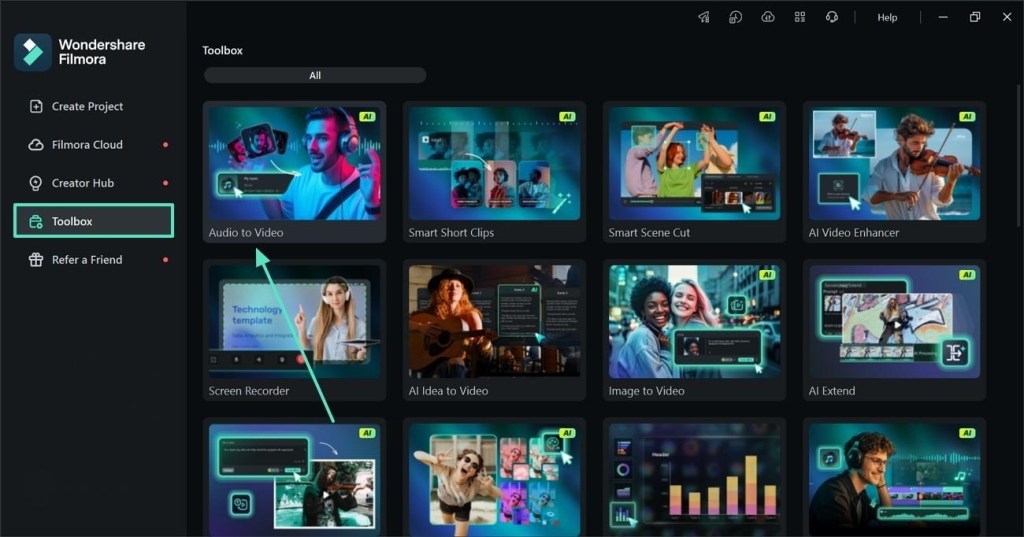
To start the process, select the “Toolbox” tab from the left panel and select the “Audio-to-Video” feature from the following list of features.
Step 2. Paste a Video URL
When the next window opens, paste the YouTube video URL in the designated field and move forward. This tool also offers importing an audio file and converting it into engaging videos.

Step 3. Customize the Video as Needed
Using the next screen, enter the video’s “Language,” “Content Type,” “Ratio,” “Duration,” and “Screen Settings.” Once done, click the “Generate” button at the bottom right to save the video to the device.

Step 4. Edit or Export the Video
As the video clips are generated, find the one with the highest rankings and preview it. If the video is satisfactory, click the “Export” button to save it to the device. Click the “Edit” button if the video needs more tweaking.

Conclusion
Old lip-sync methods required lots of expertise and advanced equipment. Wondershare Filmora offers an AI audio-to-video feature that ensures lip synchronization while reducing production time. This audio-to-video generator automates lip and motion matching, reduces editing complexity, and enhances productivity.
Note to Reader: This section is an independent editorial review based on publicly available product information and comparative analysis. It is intended for informational purposes only and does not represent the official views or endorsements of any publisher, software company, or media organization.

Axee Davies is the founder of AxeeTech, publishing gaming guides, codes, and Windows how-tos since March 2013. A tech enthusiast for 13+ years — starting with smartphones and Android rooting — he now runs a site that puts out a new guide every day for Roblox players, traders, and Windows users. More about AxeeTech
More How to You May Like
 Top 3 Free online MBOX to PST Converters
 Windows Resource Protection Could Not Start the Repair Service
 Night Light Not Working in Windows 11: 7 Easy Fixes
 Windows 11 Update Stuck at 46%: 7 Proven Fixes
 Start Menu Not Working in Windows 11: 7 Fixes That Work
 Repair Windows 10 From USB: 7 Step-by-Step Fixes
 BitLocker Waiting for Activation: 6 Fixes That Work
 Windows RE Image Was Not Found: 6 Fixes That Work [Repair Builder]