Guid to “Apple Account Security Alert Text” It’s a Scam
Introduction to the Apple Account Security Alert Text Scam
The “Apple account security alert text” is a common phishing scam designed to trick users into revealing their personal and financial information.
These messages often appear as official alerts from Apple but are actually fraudulent attempts to steal your data. Many users have asked this question, “Is this text from Apple a Scam?” on various social media posts. So we came up with this complete guide that will help you identify, handle, and prevent such scams. [Do checkout: Steam Account Alert]

How to Identify the Apple Account Alert Scam
Here are key signs that the text is a scam:
- Unsolicited Messages: Apple rarely sends security alerts via text unless you have explicitly enabled this feature. Most official communications are sent through email or within the Apple ecosystem.
- Generic Greetings: Legitimate Apple messages usually address you by your full name. Scam texts often use generic terms like “Apple Customer” or no name at all.
- Urgent Language: Phrases like “act immediately” or “failure to respond may result in irreversible charges” are designed to panic you into taking hasty actions.
- Suspicious Links and Phone Numbers: Scam texts often include fake phone numbers (e.g., +1-866-558-5754) or URLs that mimic Apple’s official sites but are slightly misspelled (e.g., “appel-pay.com” instead of “apple.com”).
- Requests for Personal Information: Apple will never ask for your password, security codes, or financial details via text.
- False Claims of Unauthorized Activity: Many scam texts mention specific amounts (e.g., $143.95) and claim that your account is at risk. However, these details are often fabricated.
Do Checkout: Access Denied Error 17 in Pokemon Center

Immediate Steps to Take
If you receive a suspicious Apple account Alert text:
- Do Not Respond or Click Links: Interacting with the message could lead to malware installation or direct theft of your information.
- Verify Directly Through Official Channels:
- Check your Apple account activity by logging into appleid.apple.com.
- Review your purchase history in the App Store or iTunes Store.
- Contact Apple Support directly using the official phone number or website.
- Check Your Financial Accounts: Look for any unauthorized transactions in your bank or credit card statements. If you find any, report them to your financial institution immediately.
- Report the Scam:
- Forward the text to [email protected].
- Report to the Federal Trade Commission (FTC) via reportfraud.ftc.gov if you’re in the U.S..
How to Verify Legitimate Apple Communications
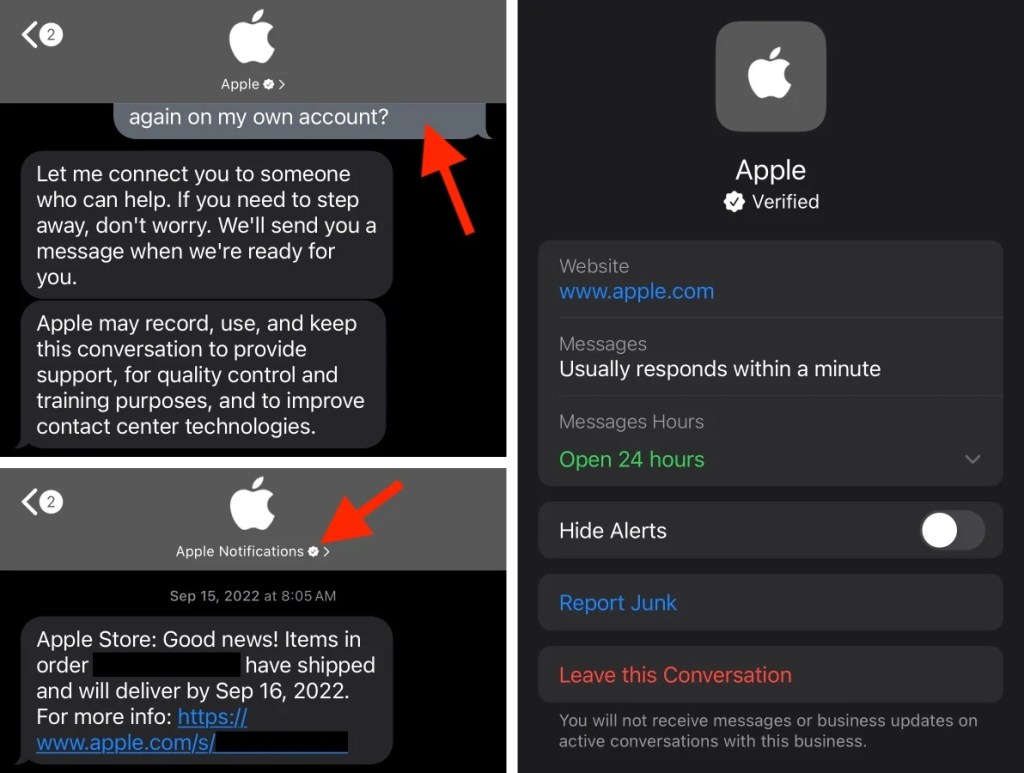
- Official Apple Emails: Legitimate emails from Apple will come from domains like
@apple.comand will include detailed information about your account, such as your billing address. - No Requests for Sensitive Data: Apple will never ask for your password, security codes, or financial information via email or text.
- Check Account Directly: Always log into your Apple account directly through the official website or app to verify any alerts.
Preventing Future Apple Account Alert Scams
- Enable Two-Factor Authentication (2FA): This adds an extra layer of security to your Apple account.
- Use Strong, Unique Passwords: Avoid reusing passwords across different platforms.
- Be Cautious with Unknown Links and Numbers: Do not click on links or call numbers from unsolicited messages.
- Educate Yourself and Others: Share information about common Apple Account Alert scams to help others avoid falling victim.
- Install Security Software: Use reputable security apps to filter out spam and phishing attempts.
Do check: Microsoft Account Security Alert Email
What to Do If You Fell for the Scam
If you accidentally shared personal information:
- Change Your Apple ID Password Immediately: Do this through the official Apple website.
- Contact Your Bank: Report potential fraud and consider canceling affected cards.
- Check for Unauthorized Devices: Remove any unfamiliar devices linked to your Apple account.
- Monitor Your Accounts: Keep an eye on your financial and Apple accounts for suspicious activity.
- Report to Authorities: File reports with Apple, the FTC, and local law enforcement.
Frequently Asked Questions (FAQs)
Why did I receive this scam Apple Account Security Alert text?
Scammers send these messages to large numbers of people randomly, hoping some will fall for them.
Can scammers access my account if I didn’t click the link?
No, simply receiving the text does not compromise your account. However, avoid interacting with it.
Does Apple ever send security alerts via text?
Rarely. Apple primarily uses email for official communications. If in doubt, verify through official channels.
What if I already clicked the link but didn’t enter information?
Still, change your passwords and monitor your accounts, as clicking the link could expose your device to malware.

How can I distinguish a real Apple alert from a scam?
Real alerts will never ask for sensitive information and will direct you to official Apple platforms.
Does Apple send text messages about unusual activity?
Rarely. Apple’s primary and official method for security alerts is email, not text.
How does Apple notify you of suspicious activity?
They send a detailed email to the address on file and may add a notification to the Apple ID website (appleid.apple.com).
How do I know if an Apple message is real?
A real message will never ask for personal info and will direct you to an official Apple domain (like apple.com), never a strange link.
How do I know if my Apple security alert is real?
Log in to appleid.apple.com directly. Any legitimate alert will be displayed in your account’s notification section.
Does Apple send text messages about Apple ID?
No, Apple does not use unsolicited SMS for Apple ID support, security alerts, or billing issues.
What does a fake Apple security alert look like?
It creates panic with urgent language, has spelling errors, and includes a link or phone number not from Apple’s official sites.
Apple reports phishing text?
Forward the scam text to [email protected] to help them combat these fraud attempts.
Does Apple warn you if you have been hacked?
Yes, via an official email if a login attempt looks suspicious, directing you to review activity on appleid.apple.com.
Do Checkout: E999 Kindle Error
Conclusion
The “Apple account security alert text” is a sophisticated phishing scam designed to exploit your trust in Apple. By recognizing the red flags, taking immediate action, and following preventive measures, you can protect yourself from these threats. Always verify suspicious messages through official channels and report scams to help others stay safe.
Stay vigilant and share this guide to help others avoid falling victim to this scam!

Axee Davies is the founder of AxeeTech, publishing gaming guides, codes, and Windows how-tos since March 2013. A tech enthusiast for 13+ years — starting with smartphones and Android rooting — he now runs a site that puts out a new guide every day for Roblox players, traders, and Windows users. More about AxeeTech
More Guides You May Like
 Unstable SMP Civil War Finale Simulator: Free Minecraft 1.21.11 Map Download & Guide
 Switch 2 Battery Life: How Long It Lasts and How to Charge It
 Steam Deck Charging: Watts, Charger and Charge Time Explained
 Switch 2 Game-Key Card Explained: How It Works and Whether to Buy One
 How to Check Your BIOS Version in Windows (3 Easy Ways)
 Gigabyte BIOS Update: How to Flash Your Motherboard With Q-Flash
 BIOS ID Check Error: What It Means and How to Fix It Safely
 OnePlus 15 China vs Global: PLK110 vs CPH2747, Differences & Which to Buy