Minecraft Exit Code Analyzer: Free Crash Fix and Best JVM Arguments Generator (10 Codes)
The Minecraft exit code analyzer turns the number on your crash screen into a likely cause and a fix list, and writes a line of JVM arguments with the right amount of memory for your PC and mod pack.
Minecraft: Java Edition reports a crash as an exit code. Exit code 1 is the common one, but the long negative numbers such as -1073740791 are Windows error codes in disguise, and each points at a different cause. Pick your code below.
Table of Contents
How the Minecraft Exit Code Analyzer Works
The Minecraft exit code analyzer keeps a cause and a fix list for each exit code. It adjusts the list for your mod loader, so a vanilla player is not told to remove mods, and it works out a memory allocation from your system RAM and how heavy your setup is. The result is a single line of JVM arguments you can paste into the launcher.
- Pick the exit code from the crash screen.
- Pick your mod loader.
- Pick your system RAM and Minecraft version.
- Follow the steps in order.
- Paste the JVM line into Installations, Edit, More Options, JVM Arguments.
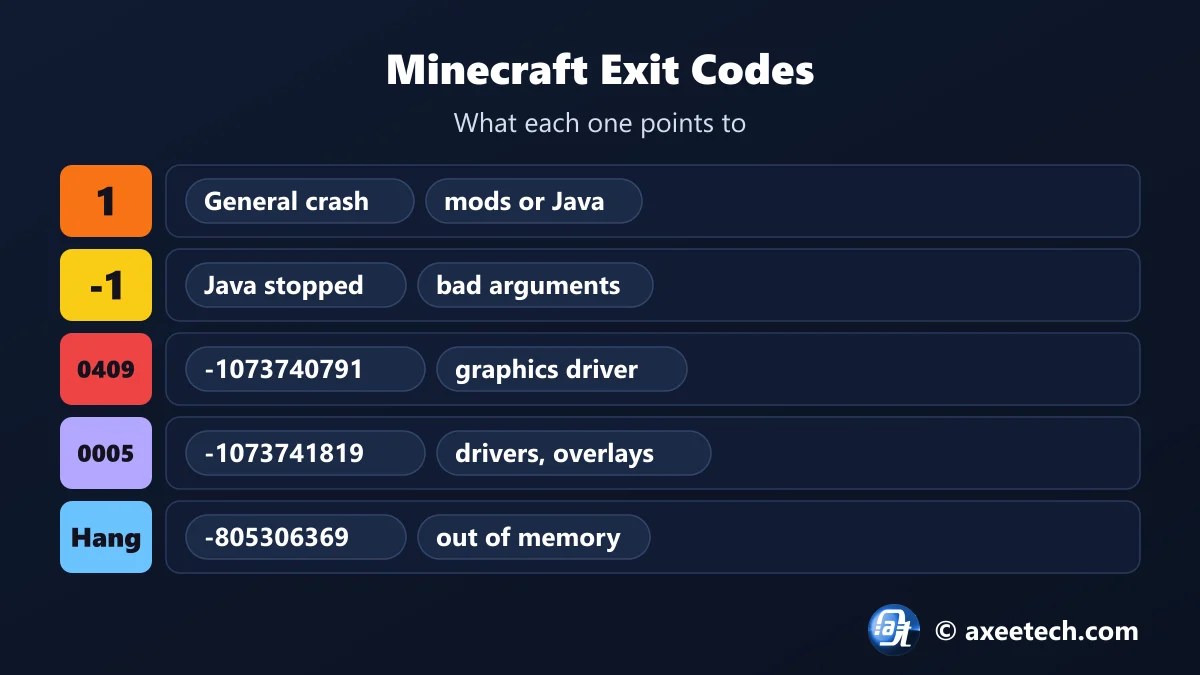
Minecraft Exit Codes and What They Mean
| Exit code | Name | Likely cause |
|---|---|---|
| 1 | General crash | A mod, a wrong Java version or a damaged game file stopped the game while it was starting. |
| -1 | Java stopped unexpectedly | The Java process ended with an error, usually from bad JVM arguments or a mod built for another version. |
| -1073741819 | Access violation (0xC0000005) | The game tried to use memory it does not own. Graphics drivers and overlays are the usual cause. |
| -1073740791 | Stack buffer overrun (0xC0000409) | Windows closed the game because a driver or injected program corrupted memory. |
| -805306369 | Game stopped responding (0xCFFFFFFF) | The game hung and Windows ended it. It ran out of memory or a mod froze it. |
| -1073740940 | Heap corruption (0xC0000374) | Memory was corrupted, usually by a driver or a native library in a mod. |
| -1073741571 | Stack overflow (0xC00000FD) | Code called itself too many times, almost always a mod conflict. |
| 255 | Crash during loading | The game closed itself after an error, most often a mod conflict or a bad config file. |
| -2 | Launch failed | The launcher could not start Java with the given settings. |
| 137 | Killed for using too much memory | On Linux, macOS or a server, the system ended the game because memory ran out. |
The long negative codes are Windows status codes. For example, -1073740791 is 0xC0000409 and -1073741819 is 0xC0000005. They mean Windows ended the game, which is why drivers and overlays, not mods, are the first thing to check.
How Much RAM to Allocate to Minecraft
| Setup | 8 GB PC | 16 GB PC | 32 GB PC |
|---|---|---|---|
| Vanilla | 4 GB | 4 GB | 4 GB |
| Fabric or Forge with a few mods | 4 GB | 6 GB | 6 GB |
| Large modpack | 4 GB (the minimum, expect lag) | 8 GB | 10 GB |
More is not better. Give Minecraft more than half your RAM and Windows starts swapping, and a very large heap makes garbage collection pauses longer. Vanilla runs well on 2 to 4 GB.

Which Java Version Does Minecraft Need?
| Minecraft version | Java version |
|---|---|
| 1.16.5 and older | Java 8 |
| 1.17 | Java 16 |
| 1.18 to 1.20.4 | Java 17 |
| 1.20.5 to 1.21.x | Java 21 |
| 26.1 and newer | Java 25 |
The official launcher installs the right Java for vanilla. Problems start with third-party launchers and modpacks that point at a Java you installed yourself. An old modpack on a new Java, or the reverse, is the classic exit code 1.
Exit Code 1 on CurseForge, Forge and Fabric
- Read the log first. Open logs/latest.log and look at the last error. It usually names the mod.
- Check versions. Every mod must match both the Minecraft version and the loader.
- Look for missing libraries. Many mods need a library mod such as Fabric API or Architectury.
- Halve the list. Remove half the mods, test, and repeat on the half that crashes.
- Use the Minecraft exit code analyzer to reset your JVM arguments before blaming a mod.
Minecraft Exit Code Analyzer Worked Example
A large modpack on a 16 GB PC crashes with exit code -805306369. The Minecraft exit code analyzer labels it as the game not responding, usually from running out of memory, and writes a JVM line with -Xmx8G. For vanilla on the same PC it would allocate 4 GB.
About Minecraft
Minecraft is a sandbox game from Mojang Studios, owned by Microsoft. Java Edition runs on the Java Virtual Machine, which is why its crashes show up as exit codes and why memory is set with JVM arguments.
Mods load through Fabric, Quilt, Forge or NeoForge, and modpacks are distributed through launchers such as CurseForge and Modrinth. Bedrock Edition does not use Java and does not show these codes.
The Minecraft exit code analyzer on this page is free to use, and we update it when the game changes its numbers.
Official page: Minecraft official site.
Related Calculators
If this Minecraft exit code analyzer helped, these free tools work the same way.
- Which Minecraft version is best
- GETSOCKOPT Minecraft error fixes
- Minecraft Launcher error 0x89245111 fix
- Windows 11 repair command generator
- All free gaming and tech calculators
New this month: GTA 6 preload troubleshooter, Roblox error code fixer, MW4 settings generator, Secure Boot TPM 2.0 fix generator.
Frequently Asked Questions
Quick answers about Minecraft and the Minecraft exit code analyzer.
What does Minecraft exit code 1 mean?
A general crash while starting. The usual causes are a broken or mismatched mod, the wrong Java version, or damaged game files.
What does exit code -1073740791 mean?
Windows closed the game after a driver or injected program corrupted memory. Update your graphics driver and close overlays.
What does exit code -805306369 mean?
The game stopped responding and was ended, usually because it ran out of memory or a mod froze it.
How much RAM should I allocate to modded Minecraft?
6 GB for a few mods and 8 GB for a large modpack on a 16 GB PC. Never more than half your system RAM.
What Java does Minecraft 1.21 need?
Java 21. Versions 1.18 to 1.20.4 need Java 17, and 1.16.5 and older need Java 8.
Is the Minecraft exit code analyzer free?
Yes. It runs in your browser and needs no sign-up.

Axee Davies is the founder of AxeeTech, publishing gaming guides, codes, and Windows how-tos since March 2013. A tech enthusiast for 13+ years — starting with smartphones and Android rooting — he now runs a site that puts out a new guide every day for Roblox players, traders, and Windows users. More about AxeeTech
More Games You May Like
 The Fascinating World of Pokémon Competitions
 Blue Lock Rivals 8v8 Update: New Modes, Codes, and Strategies for 2026
 Cricket 26 NRR Calculator: Free Net Run Rate and Best Next-Match Planner (T20, ODI)
 PUBG Mobile Flash Compatibility Checker: Free RAM, Storage and Best FPS Check (2GB Phones)
 Once Human Starchrom Calculator: Free Cap and Best Crate Planner (66,000 a Month)
 Night Rider Calculator: Free Bike Cost, Cash and Best Upgrade Planner (10 Bikes)
 Creature Kitchen Recipe Finder: Free Locations for All 43 Best Recipes (2026)
 +1 Anime Eyes Calculator: Free Shinobi Egg Odds and Best Chakra Multiplier Tool (2026)
