Roblox Error Code Fixer: Free Lookup and Best Fix Commands for 35 Codes
The Roblox error code fixer tells you what your error code means, whether the problem is Roblox, the experience or your own device, and the exact steps to fix it on Windows, phone or console.
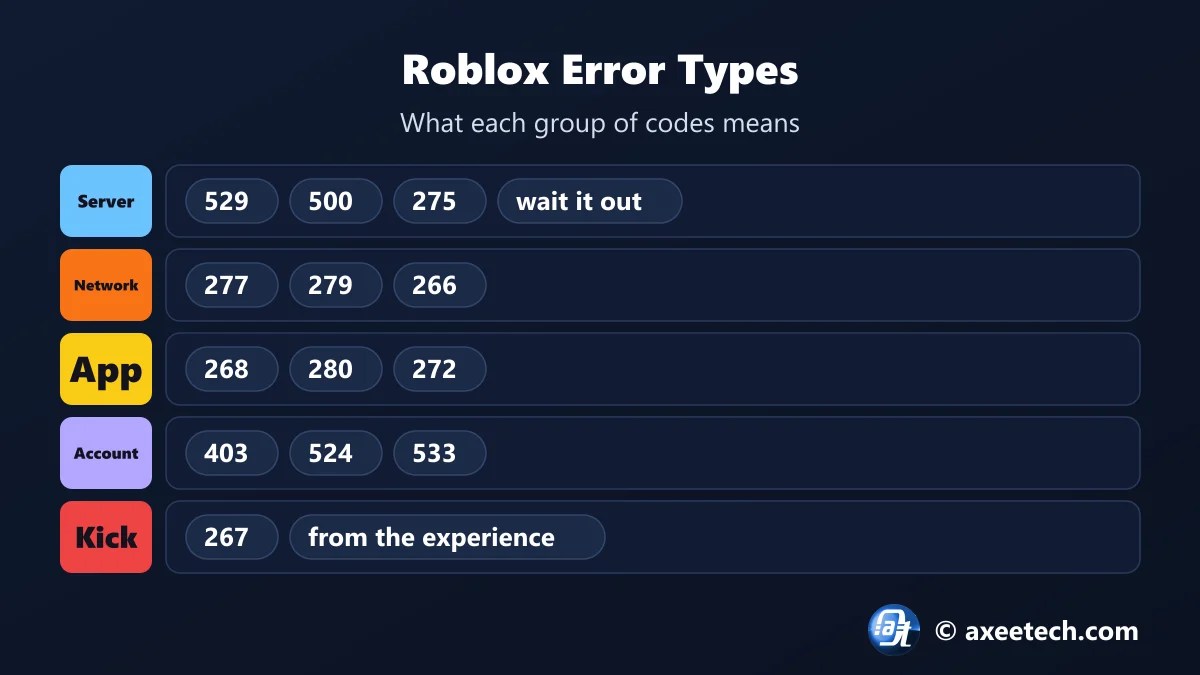
Most Roblox errors fall into six groups: a server outage, a network problem, a damaged app or cache, an account restriction, a kick, or an idle timeout. Knowing the group saves you from reinstalling Roblox for an error that was never on your side. Pick your code below.
Table of Contents
How the Roblox Error Code Fixer Works
Every code in the Roblox error code fixer is tagged with one of six causes. The tool reads the tag, shows who is responsible, and picks the fix list for your device. On Windows it also prints the Command Prompt commands for network and cache problems, so you can copy them in one go.
- Pick the number shown in the Roblox error box.
- Pick your device.
- Read what it means and whether it is on your side.
- Follow the steps in order.
- On Windows, copy the commands into Command Prompt as administrator.
All Roblox Error Codes and What They Mean
| Code | Message | Type | Whose side |
|---|---|---|---|
| 103 | The Roblox experience you are trying to join is currently not available | Account or permission | Your account |
| 256 | Developer has shut down all game servers | Server or outage | The experience |
| 260 | There was a problem receiving data | Network | Your connection or Roblox |
| 261 | Error while receiving data | Network | Your connection |
| 262 | There was a problem sending data | Network | Your connection |
| 264 | Same account launched from a different device | Account or permission | Your account |
| 266 | Your connection timed out | Network | Your connection |
| 267 | You were kicked from this experience | Kick or ban | The experience |
| 268 | You have been kicked due to unexpected client behavior | App or cache | Your device |
| 271 | Server was shut down | Server or outage | The experience |
| 272 | Disconnected due to security key mismatch | App or cache | Your device |
| 273 | Same account launched from a different device | Account or permission | Your account |
| 274 | The experience is shut down for maintenance | Server or outage | The experience |
| 275 | Roblox has shut down the server for maintenance | Server or outage | Roblox |
| 277 | Please check your internet connection and try again | Network | Your connection |
| 278 | You were disconnected for being idle for 20 minutes | Idle timeout | You |
| 279 | Failed to connect to the game | Network | Your connection |
| 280 | Your version of Roblox may be out of date | App or cache | Your device |
| 400 | Bad request | Server or outage | Roblox |
| 403 | Access denied or authentication failed | Account or permission | Your account or network |
| 404 | Page not found | Server or outage | Roblox |
| 500 | Internal server error | Server or outage | Roblox |
| 504 | Gateway timeout | Server or outage | Roblox |
| 517 | This experience has ended | Server or outage | The experience |
| 522 | The user you followed has left the experience | Server or outage | The experience |
| 523 | The server has shut down | Server or outage | The experience |
| 524 | You do not have permission to join this experience | Account or permission | Your account |
| 529 | We are experiencing technical difficulties | Server or outage | Roblox |
| 533 | Your privacy settings prevent you from joining this server | Account or permission | Your account |
| 610 | Unable to join private server | Account or permission | Roblox or your account |
| 769 | Teleport failed: unknown exception | Server or outage | The experience |
| 770 | Teleport failed: destination not found | Server or outage | The experience |
| 771 | Teleport failed: server is no longer available | Server or outage | The experience |
| 772 | Teleport failed: server is full | Server or outage | The experience |
| 773 | Teleport failed: attempted to teleport to a place that is restricted | Account or permission | The experience |
For longer write-ups of each code, see our full list of Roblox error codes.
Is Roblox Down or Is It You?
| Sign | Roblox or the experience | Your device or network |
|---|---|---|
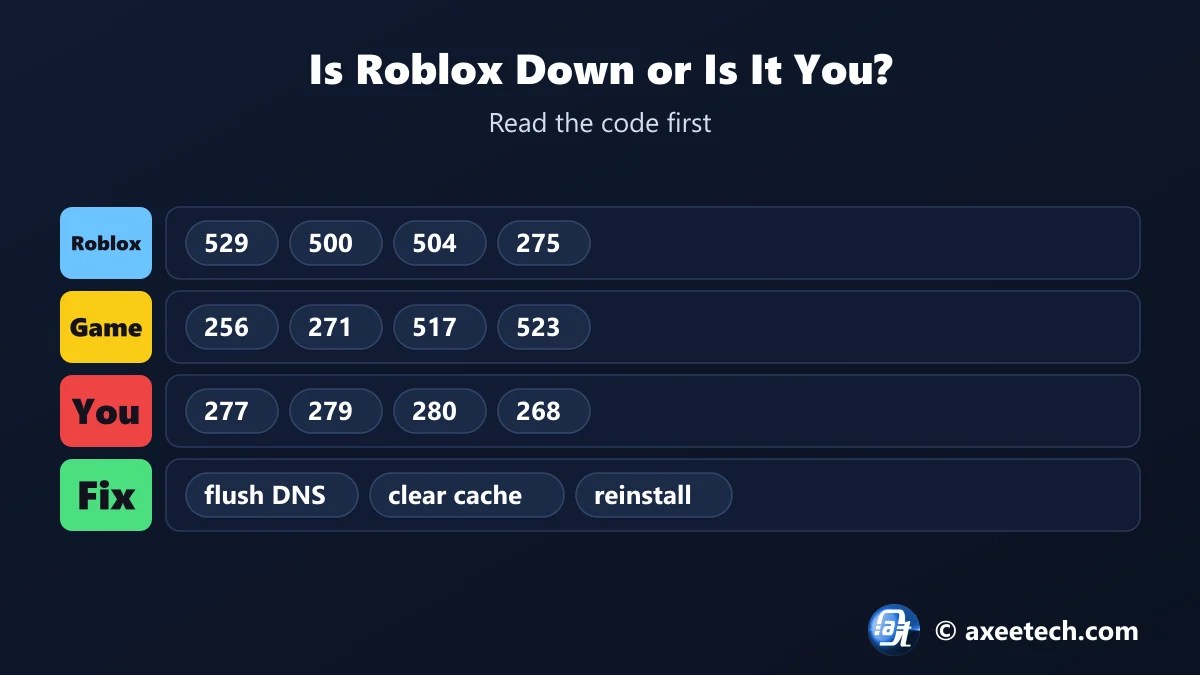
| Codes | 256, 271, 274, 275, 500, 504, 517, 523, 529 | 260 to 262, 266, 277, 279, 280 |
| Other experiences | Also fail | Often work |
| Other devices on your Wi-Fi | Also fail | May work |
| Mobile data | Still fails | Works |
| Best move | Wait | Follow the fix steps |
The Roblox error code fixer makes this call for you from the code alone. Error 529 is the clearest outage signal: it means a Roblox service could not answer. Error 277 is the clearest sign of a problem on your side, because it means your link to the game server dropped.
Windows Commands That Fix Roblox Network Errors
| Command | What it does |
|---|---|
| ipconfig /flushdns | Clears saved DNS lookups, so Roblox addresses are looked up fresh |
| netsh winsock reset | Resets the Windows network socket catalog |
| netsh int ip reset | Resets TCP/IP settings |
| ipconfig /release and /renew | Asks your router for a new local address |
| rmdir /s /q “%temp%\Roblox” | Deletes the Roblox temporary cache |
| del /q “%localappdata%\Roblox\logs\*” | Deletes old Roblox log files |
The Roblox error code fixer prints these for network and cache errors. Open Start, type cmd, right-click Command Prompt and choose Run as administrator. Restart the PC afterwards. For more repair commands, use our Windows 11 repair command generator.
Kicks and Bans: Errors 267, 268 and 272
These three are the codes people most often bring to the Roblox error code fixer. Error 267 comes from the experience, not from Roblox. A script or a moderator in that game removed you, and the message usually gives the reason. Error 268 and error 272 come from the client: the game noticed software changing how Roblox runs. Remove exploit tools and injectors, clear the cache and reinstall. A ban from one experience does not ban your Roblox account.
Roblox Error Code Fixer Worked Example
You see error 277 on a Windows 11 laptop. The Roblox error code fixer labels it a network problem on your connection, lists six steps and prints five commands, starting with ipconfig /flushdns. Switch the code to 529 and the answer changes: it is a Roblox outage, there is nothing to fix, and the advice is to wait.
About Roblox
Roblox is an online platform from Roblox Corporation where players join experiences built by other users. It runs on Windows, Mac, Android, iOS, Xbox and PlayStation, and every experience runs on servers that Roblox hosts.
Because each experience is its own game with its own scripts, an error can come from Roblox, from the experience, or from your device. The number in the error box tells you which.
The Roblox error code fixer on this page is free to use, and we update it when the game changes its numbers.
Official page: Roblox Support.
Related Calculators
If this Roblox error code fixer helped, these free tools work the same way.
- All Roblox error codes
- Windows 11 repair command generator
- Wi-Fi connected but no internet fix
- Roblox DevEx calculator
- All free gaming and tech calculators
New this month: GTA 6 preload troubleshooter, MW4 settings generator, Minecraft exit code analyzer, Secure Boot TPM 2.0 fix generator.
Frequently Asked Questions
Quick answers about Roblox and the Roblox error code fixer.
What does Roblox error code 277 mean?
You lost the connection to the game server. It is almost always a Wi-Fi drop, packet loss or a router problem on your side.
What does Roblox error code 268 mean?
You were kicked for unexpected client behavior. Remove exploit tools or overlays, clear the Roblox cache and reinstall.
What does Roblox error code 279 mean?
Roblox could not connect to the game server. A firewall, router or network filter is usually blocking it.
What does Roblox error code 529 mean?
A Roblox service is down or overloaded. You cannot fix it yourself. Wait and try again.
What does Roblox error code 267 mean?
The experience kicked you through a script or a moderator. It can be a temporary kick or a ban from that game.
Is the Roblox error code fixer free?
Yes. It runs in your browser and needs no sign-up.

Axee Davies is the founder of AxeeTech, publishing gaming guides, codes, and Windows how-tos since March 2013. A tech enthusiast for 13+ years — starting with smartphones and Android rooting — he now runs a site that puts out a new guide every day for Roblox players, traders, and Windows users. More about AxeeTech
More Games You May Like
 CookieRun: Tower of Adventures Codes (November 2026)
 Monopoly Go Sticker Boom November 11–12, 2026: 50% More Stickers for 15 Minutes
 PUBG Mobile Flash Compatibility Checker: Free RAM, Storage and Best FPS Check (2GB Phones)
 Once Human Starchrom Calculator: Free Cap and Best Crate Planner (66,000 a Month)
 Night Rider Calculator: Free Bike Cost, Cash and Best Upgrade Planner (10 Bikes)
 Creature Kitchen Recipe Finder: Free Locations for All 43 Best Recipes (2026)
 +1 Anime Eyes Calculator: Free Shinobi Egg Odds and Best Chakra Multiplier Tool (2026)
 Sell Fries Calculator: Free Upgrade Cost and Best Automation Planner (19 Upgrades)
