The Starlite HSR Server: The Ultimate Guide to Preserving Story Mode & Safe Emulation
For millions of players, Honkai: Star Rail represents the pinnacle of modern gacha storytelling. From the snowy, post-apocalyptic wastes of Jarilo-VI to the neon-drenched, dreamscapes of Penacony, HoYoverse has crafted a sprawling sci-fi epic. But there is a fundamental flaw in how this epic is delivered: Gacha Fatigue.
Experiencing the narrative naturally often requires hitting arbitrary Trailblaze Level gates, grinding Simulated Universe points, or waiting weeks for Stamina to replenish just to unlock the next chapter. Conversely, the temptation to bypass this grind leads many to seek out a Starlite HSR server. However, the internet is flooded with 15-second TikToks pushing sketchy, malware-laced APKs, or deeply technical RaGEZONE forum threads meant exclusively for backend Java developers.
Worse yet, those who successfully install a private server are met with a devastating secondary problem: The Sandbox Trap. On 99% of HSR private servers, all Trailblaze Missions unlock simultaneously the moment you log in. The narrative pacing is destroyed, emotional cutscenes trigger out of order, and the game devolves into a chaotic mess of unearned Stellar Jade and E6S5 characters.
You aren’t just looking for unlimited pulls; you are desperately searching for a Private Server that lets you play Story Mode sequentially. You want a “Narrative Preservation Tool.”
This comprehensive, 3,000-word pillar page is the ultimate authoritative guide to the Starlite HSR server. We will move past the generic “how to hack” tutorials and dive deep into the technical architecture of HSR emulation. You will learn how to manually direct your own story pacing using GM commands, how to route traffic safely via Mitmproxy and Fiddler, and most importantly, how to blind HoYoverse’s telemetry to protect your hardware from catastrophic bans.
Also on Axeetech: HSR Tier List
What is the Starlite HSR Server?
To understand how to manipulate the Starlite HSR server, you must first understand the fundamental architecture of Honkai: Star Rail.
HSR is not a standalone game; it is a Client-Server application. The client installed on your PC or mobile device (StarRail.exe or the Android APK) is essentially a “dumb terminal.” It contains the 3D assets, the audio files, the Unity engine rendering logic, and the UI. However, it holds zero authority over your inventory, your Trailblaze level, your quest progression, or the outcome of a battle. Every time you open a chest, win a fight, or speak to an NPC, the client sends an encrypted packet to HoYoverse’s official servers. The server validates the action, updates the database, and sends a response back to the client.
The Starlite HSR server (along with similar backend emulators like LunarCore or Yuuki) is a custom-built, reverse-engineered replica of HoYoverse’s backend logic. Usually written in Java or Go, it mimics the official server’s packet responses.
Do checkout: YuuKiPs Commands
The Role of the Proxy (Mitmproxy & Fiddler)
Because the official HSR client is hardcoded to only talk to HoYoverse’s official domains (e.g., api-os-takumi.mihoyo.com), you cannot simply “point” the game to Starlite. Instead, modders use a Man-in-the-Middle (MITM) Proxy like Fiddler Classic or Mitmproxy.
The proxy intercepts your game’s outbound HTTPS traffic, decrypts it using a custom Root Certificate, and reroutes the requests from HoYoverse’s servers to your local or custom-hosted Starlite server (127.0.0.1). The Starlite server processes the request (e.g., “Grant 1000 Stellar Jade”) and sends the spoofed response back through the proxy to your game client. The client, none the wiser, renders the Jade in your inventory.
Starlite vs. Grasscutter
If you are familiar with the modding scene, you have likely heard of Grasscutter. Grasscutter is the legendary, highly mature backend emulator for Genshin Impact. Starlite is effectively the HSR equivalent of Grasscutter. However, because HSR is a newer game with a heavily revamped questing engine, Starlite and its peers face unique challenges regarding Lua Scripts—the underlying code HoYoverse uses to direct cutscenes, camera angles, and NPC spawning during Trailblaze Missions. This brings us to the biggest hurdle in private server emulation: The Story Mode.
The “Story Mode” Problem (And How to Fix It)
If you have ever logged into an HSR private server, you know the feeling. You spawn in the Parlor Car. You open the Navigation menu, and every single chapter—from the Herta Space Station prologue to the climax of Penacony and beyond—is marked as “Available.”
Why Private Servers Break Linear Progression
In the official game, quest progression is gated by a complex web of database flags. To unlock Chapter 2, the server checks if Quest_101_FinalBoss_Defeated == TRUE and Trailblaze_Level >= 18.
When developers build a private server emulator like Starlite, they face a massive dilemma: Soft-locking. If a player uses a GM command to spawn an endgame boss, but their database “Story Flag” is still set to the prologue, the game’s Lua scripts will break. The player might fall through the map, or the server will crash because the required environmental assets haven’t been loaded by the story engine.
To prevent players from getting permanently stuck, server developers often write initialization scripts that set All_Main_Quests = UNLOCKED by default. They dump you into a sandbox. While this is great for testing an E6S5 Firefly team composition in the endgame, it completely ruins the Private Server that lets you play Story Mode experience. Cutscenes skip, NPCs stand in the wrong locations, and the emotional weight of the Trailblaze narrative is lost.
The Solution: Narrative Preservation via GM Commands
To truly experience the story, you must stop being just a player and become the Game Master (GM) of your own narrative. You must manually lock the endgame content, set your Trailblaze level to match the canonical requirements, and use the GM Handbook to trigger quests sequentially.
By taking control of the quest flags, you can simulate a natural playthrough. You can grant yourself just enough Stellar Jade to build a canon-accurate team (e.g., pulling March 7th, Dan Heng, and Asta) and experience the story exactly as the writers intended, free from the frustration of Stamina gates and pity systems.
Step-by-Step Setup Guide (PC & Mobile)
⚠️ CRITICAL WARNING: Running modified clients and intercepting traffic violates HoYoverse’s Terms of Service. If you use your main, real-money HoYoverse account on a private server, it will eventually be flagged and banned. Always use a Burner Account or an offline local login (UID 1) provided by the server emulator.
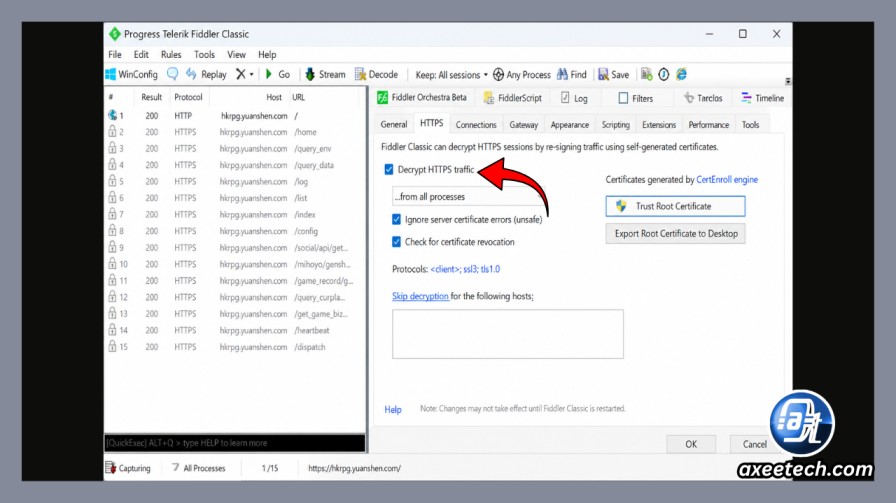
Phase 1: The PC Setup (Fiddler & Certificate Routing)
The PC version of HSR is generally easier to proxy than mobile, provided you bypass the client’s signature checks.
- Acquire the Patched Client: You cannot use the official HoYoverse launcher. You must download a community-patched
StarRail.exe(often distributed via the Starlite or LunarCore Discord servers) that disables themihoyosdksignature verification. - Install Fiddler Classic: Download and install Fiddler Classic (not Fiddler Everywhere).
- Enable HTTPS Decryption:
- Go to Tools > Options > HTTPS.
- Check “Capture HTTPS CONNECTs” and “Decrypt HTTPS traffic”.
- Click “Actions” and select Trust Root Certificate. This installs the Fiddler certificate into your Windows Certificate Store, allowing the proxy to read the game’s encrypted traffic.
- Configure the AutoResponder:
- Go to the AutoResponder tab in Fiddler.
- Check “Enable rules” and “Unmatched requests passthrough”.
- Add a rule:
regex:(?insx).+\.mihoyo\.com->*443(or route to your specific local Starlite server IP, usually127.0.0.1:443or8888).
- Launch the Game: Start your patched
StarRail.exe. The traffic will flow through Fiddler, hit the Starlite backend, and log you into the private server.
Phase 2: The Mobile Setup (Android & iOS)
Mobile setup is notoriously difficult because modern mobile operating systems actively distrust user-installed Root Certificates, which breaks the MITM proxy.
For Android:
- The Root Method (Recommended): If your device is rooted via Magisk, use a module like “Move Certificates” to force the Fiddler/Mitmproxy CA certificate into the
/system/etc/security/cacerts/directory. The game will trust it natively. - The Non-Root Method: You must use a specialized virtual environment app like HttpCanary or VMOS, or download a pre-patched APK that has the proxy IP hardcoded into the
config.inifile, bypassing the need for a certificate entirely.
For iOS:
- iOS is a walled garden. You cannot simply download a patched IPA from the App Store.
- You must use AltStore or SideStore to sideload a decrypted, patched HSR IPA.
- To handle the proxy, you must purchase and configure Shadowrocket or Quantumult X to create a local MITM proxy rule that intercepts HoYoverse domains and redirects them to your Starlite server IP.
Essential GM Handbook for Story Players
To fix the “Sandbox Trap” and create a Private Server that lets you play Story Mode linearly, you need to master the server’s command console. In-game, this is usually accessed by typing into the chat box (if the server enables it) or via an external web dashboard linked to your UID.
Below is the essential Markdown table of GM commands required for Narrative Preservation.

(Note: Exact syntax may vary slightly between Starlite, Yuuki, and LunarCore backends. Always consult your specific server’s GitHub repository for the latest GM Handbook).
| Command Syntax | Function | Story Mode Application (Narrative Preservation) |
|---|---|---|
/quest add [id] | Manually adds a quest to your log. | Use this to unlock the next canonical Trailblaze Mission after finishing the previous one, preventing the “all quests unlocked” sandbox issue. |
/quest finish [id] | Marks a quest as completed in the database. | Use this to skip tedious, unskippable daily grinding quests that gate the main story, while keeping the main narrative flags intact. |
/scene [id] [prop] | Forces a scene transition and loads a specific map block. | Crucial for fixing “soft-locks.” If a cutscene fails to load because of a missing Lua script, use this to manually teleport to the next room or NPC. |
/set level [1-70] | Sets your Trailblaze Level. | Vital for Pacing. Manually set your level to match the canonical requirement of the story chapter you are playing to maintain immersion. |
/give [item] [amt] | Spawns items, materials, or Stellar Jade. | Grant yourself exactly 1600 Stellar Jade to simulate a natural 10-pull, rather than spawning 999,999 Jade which ruins the economy and immersion. |
/talent [avatar] [lvl] | Upgrades character traces and talents. | Allows you to build canon-accurate teams (e.g., maxing out March 7th’s shields for the Belobog arc) without farming Calyxes for weeks. |
/heal | Fully restores HP and Skill Points. | Use before major canonical boss fights (like Kafka or Cocolia) to ensure a fair, cinematic battle without relying on endgame Relics. |
Finding Quest IDs and Scene IDs
The hardest part of Narrative Preservation is knowing the IDs. You cannot guess that the Kafka boss fight is Scene 20314. You must download the community-maintained GM Handbook (usually a massive Excel or CSV file hosted on the server’s GitHub). This handbook maps every internal HoYoverse string, item, avatar, and quest to its numerical ID. Keep this handbook open on a second monitor while you play.
Security, Telemetry, and Ban Risks (The Missing Truth)
This is the section that separates amateur modders from veteran engineers. Most TikToks will tell you that using a private server is “100% safe.” This is a dangerous lie.
While HoYoverse rarely bans players solely for playing on an offline, local host server, the danger lies in Telemetry Leakage and Anti-Cheat Triggers. If you do not secure your network environment, HoYoverse’s automated systems will flag your hardware.
Understanding HoYoverse Telemetry
Telemetry is background data that the game client sends to the developer, regardless of what server you are connected to. Even if your gameplay packets are routed to Starlite via Fiddler, the HSR client is still quietly pinging HoYoverse’s logging servers (e.g., hkrpg-log-os.mihoyo.com, uspider.yahoo.com, log-upload-os.mihoyo.com).

If HoYoverse’s telemetry server receives a ping from your device’s unique HWID (Hardware ID) showing that the game is running, but their official gameplay servers show your account is offline, a flag is raised. Furthermore, if the telemetry detects modified memory addresses (from the patched StarRail.exe), it triggers an immediate ban.
The Hosts File Blockade (Actionable Security)
To play safely, you must blind the telemetry. You can do this by editing your operating system’s hosts file to route HoYoverse’s logging domains into a black hole (0.0.0.0 or 127.0.0.1).
For Windows PC:
- Open Notepad as Administrator.
- Open the file located at:
C:\Windows\System32\drivers\etc\hosts - Add the following lines to the bottom of the file to block telemetry and anti-cheat verification:
# Block HSR Telemetry & Logging
0.0.0.0 hkrpg-log-os.mihoyo.com
0.0.0.0 log-upload-os.mihoyo.com
0.0.0.0 uspider.yahoo.com
0.0.0.0 sdk-os-static.mihoyo.com
0.0.0.0 api-takumi.mihoyo.com

# Block HoYoverse Anti-Cheat (ACE)
0.0.0.0 mihoyo.com
0.0.0.0 hoyoverse.com

Note: Blocking the root domains (mihoyo.com) will prevent you from accessing the official HoYoLAB community site or playing the official game on that PC until you remove the lines.
The Threat of Hardware (HWID) Bans
If you are caught using a private server on an official account, HoYoverse does not just ban the account; they ban your HWID (Motherboard serial, MAC address, Disk Drive ID). Once HWID is banned, no official HoYoverse game will launch on your PC, displaying an error code like 31-4302.
Best Practices for Safety:
- Never link your official HoYoverse email to a private server client.
- Use a Virtual Machine (VM) or a dedicated secondary device for private server testing.
- Ensure your proxy (Fiddler/Mitmproxy) is configured to drop packets destined for any domain containing the word “log” or “telemetry” that isn’t caught by your hosts file.
Starlite vs. Yuuki vs. Grasscutter: The Server Ecosystem
When researching a Private Server that lets you play Story Mode, you will encounter several names. It is vital to understand the difference between the backend emulator (the server) and the frontend (the game).
Here is how the major players in the HoYoverse emulation scene compare in 2026.
| Feature | Starlite / LunarCore (HSR) | Yuuki PS (HSR) | Grasscutter (Genshin) |
|---|---|---|---|
| Target Game | Honkai: Star Rail | Honkai: Star Rail | Genshin Impact |
| Backend Language | Java / Go | Java | Java |
| Story Mode Compatibility | Moderate to High. Actively updating Lua script handlers for cutscenes. Main quests work; some side quests soft-lock. | Low to Moderate. Often focuses heavily on sandbox/gacha features over linear quest flags. | Masterpiece. Years of development mean 99% of Genshin’s Archon quests play perfectly. |
| Update Speed | Fast. Usually updated within weeks of a new HSR patch (e.g., Amphoreus release). | Variable. Depends on the specific Discord community maintaining the fork. | Stable. Highly mature, though major engine updates can cause temporary breaks. |
| Best Use Case | Experiencing new HSR story arcs and testing meta teams. | Quick sandbox testing, unlimited pulls, spawning bosses. | The gold standard for private server narrative preservation. |

Analyst Note: While Grasscutter remains the undisputed king of narrative preservation due to its multi-year head start, Starlite (and the broader LunarCore ecosystem it belongs to) has made massive strides in reverse-engineering HSR’s complex, multi-layered cutscene logic. If your primary goal is HSR Story Mode, Starlite-based backends are currently your most viable option.
FAQ Section (Frequently Asked Questions)
Q1: Can I play the HSR private server on iOS?
Yes, but it is highly technical. Because Apple restricts app installation and certificate management, you must decrypt the official HSR IPA, inject the Starlite proxy IP, and sideload it using AltStore or SideStore. You will also need a proxy app like Shadowrocket to handle HTTPS decryption. For most users, Android or PC is heavily recommended for a smoother experience.
Q2: Will I get banned for using Starlite?
If you use a Burner Account or an offline local UID, your account is safe because it doesn’t exist on HoYoverse’s official databases. However, your hardware (HWID) can be banned if the game client successfully sends telemetry data to HoYoverse revealing that you are running a modified executable. You must block telemetry via the hosts file to prevent hardware bans.
Q3: Why are my cutscenes skipping, crashing, or showing black screens?
This is the most common issue on any Private Server that lets you play Story Mode. Cutscenes in HSR are controlled by Lua Scripts. If the Starlite backend has not yet reverse-engineered the specific Lua script for a new cutscene (e.g., a recent Penacony cinematic), the server won’t know how to tell the client to play the video. The client assumes the scene is “finished” and skips to the next gameplay segment. You can sometimes bypass this by using the /scene GM command to manually load the next area.
Q4: How do I get unlimited Stellar Jade without breaking the story economy?
Do not use the /give 2000 999999 command. Having millions of Jade in your UI ruins the immersion and can sometimes cause database integer overflow errors on poorly optimized servers. Instead, use the GM command to grant yourself exactly 1600 Stellar Jade (one 10-pull) whenever you reach a canonical story milestone. This simulates the “free-to-play” experience without the grind, preserving the psychological reward loop of the gacha system.
Q5: Is Starlite safe from malware?
The Starlite backend code (hosted on GitHub) is generally safe and open-source. However, the pre-compiled APKs and patched .exe clients distributed on TikTok, YouTube, or random forums are massive vectors for malware, keyloggers, and crypto-miners. Never download a pre-packaged “Starlite Installer.” Always compile the client patches yourself or download them directly from the official, verified Discord/GitHub of the emulator developers.
Conclusion: Reclaiming the Trailblaze
The allure of the Starlite HSR server is undeniable. In an era where gaming is increasingly monetized through stamina gates and predatory pity systems, private servers offer a sanctuary. They allow us to experience the breathtaking art direction, the stellar voice acting, and the intricate lore of the Astral Express on our own terms.
But a sandbox is not a story. By understanding the technical architecture of HSR emulation, utilizing the GM Handbook to enforce linear progression, and rigorously defending your network against telemetry, you transform a chaotic cheat tool into a powerful Narrative Preservation Engine.
You no longer have to choose between the grind and the story. With the right setup, the universe of Honkai: Star Rail is finally, truly, in your hands. Safe travels, Trailblazer.

Axee Davies is the founder of AxeeTech, publishing gaming guides, codes, and Windows how-tos since March 2013. A tech enthusiast for 13+ years — starting with smartphones and Android rooting — he now runs a site that puts out a new guide every day for Roblox players, traders, and Windows users. More about AxeeTech
More Games You May Like
 Overwatch Coins to USD Calculator: 1000 Coins = $9.99 (Best Packs 2026)
 Steam Market Fee Calculator: 15% Fee & CS2 Skin Net Payout (2026)
 Star Citizen Retribution: What It Is and Can You Buy It
 Star Citizen Ranta Dung: Where to Find It and Price
 Star Citizen Wikelo Ships: How to Get War Special Rewards
 Star Citizen Sabre Firebird: Specs, Price and Where to Buy
 Star Citizen Executive Hangar Guide: Timer and Rewards
 Star Citizen Sabre: Specs, Variants and Where to Buy