WARDOGS Elytra “File Not Found (os error 2)” on Linux/Proton Explained
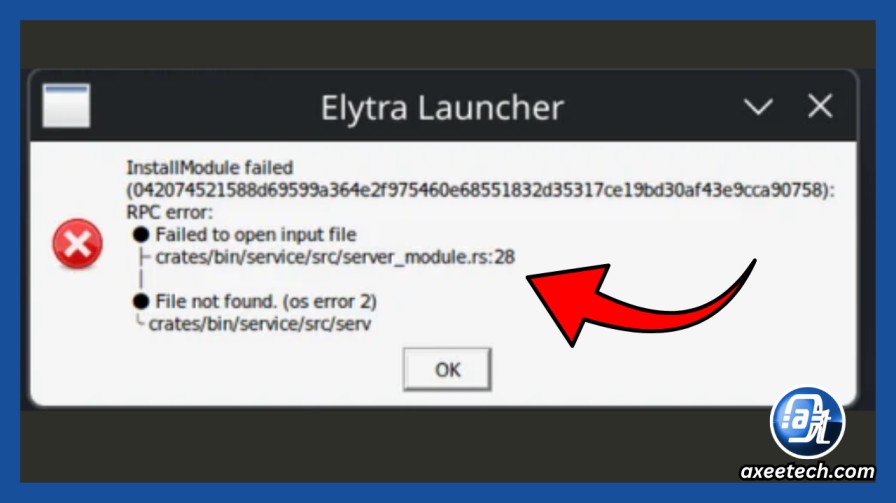
If WARDOGS refuses to start and Elytra reports something similar to:
InstallModule failed

RPC error:
Failed to open input file

crates/bin/service/src/server_module.rs:28

File not found. (os error 2)
don’t immediately start changing DNS servers, disabling your firewall, or reinstalling your network driver.
This error points somewhere else.

Quick Answer:
WARDOGS Elytra os error 2 means the anti-cheat service could not find the input file or path needed during InstallModule. In the documented Proton case, the launcher reached module installation before failing. This is different from a normal download, VPN, DNS or firewall failure.
The documented WARDOGS Proton report shows the Elytra service starting, followed by the module-installation stage failing because the expected input file could not be opened. The same report notes that Elytra’s Content directory was empty.
In other words:
This can be an installation/path problem even though the launcher presents it like an anti-cheat module problem.
What Does “os error 2” Mean?
Windows system error code 2 means:
The system cannot find the file specified.
Microsoft documentation and support material use the equivalent ERROR_FILE_NOT_FOUND description for error code 2.
That distinction matters because WARDOGS currently has another Elytra failure that looks similar but ends in:
Access is denied. (os error 5)Those are different branches.
| Elytra error | Meaning |
|---|---|
os error 2 | File/path could not be found |
os error 5 | Access was denied |
| Network download failure | Module could not be retrieved |
| Signature failure | Downloaded data failed verification |
Don’t use the same fix guide for all four.
Internal link
On the words Access is denied (os error 5), link:
/wardogs-elytra-installmodule-os-error-5-fix/
What the WARDOGS Proton Report Shows
A detailed Steam report documents this sequence:
- Elytra is installed.
service.exeis present.- The service runs as
LocalSystem. C:\Program Files\Elytra\Content\is empty.- WARDOGS launches its launcher.
InstallModulestarts.- The service cannot open the expected input file.
- Elytra returns
File not found (os error 2). - The launcher exits.
That’s much more useful than treating the entire incident as:
anti cheat doesn’t work on my PC.
The exact error tells us which stage failed.
Is WARDOGS Supported on Linux or Proton?
This is where the answer needs some restraint.
A reply in the current WARDOGS Steam discussion states that Linux play was disabled by the developers.
However, that statement appears in a community discussion rather than a formal public Linux-support document.
So the defensible conclusion is:
Current community evidence indicates that Linux/Proton is not a supported WARDOGS configuration, and the available
os error 2report appears specifically tied to Elytra operating through Wine/Proton.
That means there may simply be no reliable Proton-side fix until WARDOGS/Elytra supports that environment.
1. Confirm That You Have os Error 2
Do not stop at the launcher popup.
Look for the complete diagnostic string:
InstallModule failed
RPC error
Failed to open input file
server_module.rs:28
File not found. (os error 2)
If yours ends with:
Access is denied. (os error 5)use the separate os error 5 guide instead.
If the log says the module download itself failed, you’re dealing with another branch again.
2. Capture a Proton Log
If you’re testing WARDOGS on Linux through Proton, you can capture Proton’s own runtime log.
Open:
Steam → WARDOGS → Properties → General → Launch Options
Temporarily enter:
PROTON_LOG=1 %command%Start WARDOGS once and reproduce the failure.

Proton normally writes a log into your home directory with a filename containing the game’s Steam App ID.
Search the log for terms such as:
Elytra
InstallModule
server_module
File not found
Content
service.exe
The purpose here is diagnosis, not randomly changing Wine prefixes.
If an official bug report asks for the open-file trace later, you’ll already have it.
3. Don’t Create Random Elytra Files Manually
Seeing:
C:\Program Files\Elytra\Content\Empty may tempt you to create random folders or copy modules from somebody else’s machine.
Don’t.
Anti-cheat components are exactly the wrong files to download from strangers.

A valid repair must come from:
- Steam
- WARDOGS
- Elytra
- an official installer/update
not:
totally-safe-anticheat-file-final-v7.zip
from a forum attachment.
4. Verify the WARDOGS Installation
If you’re also seeing the error on a supported Windows installation, start with Steam verification:
Steam → WARDOGS → Properties → Installed Files → Verify integrity of game files
Then:
- Restart Windows.
- Reopen Steam.
- Allow Elytra to update.
- Launch WARDOGS again.
- Recheck the log.
On Proton, this may restore game files but cannot magically add support for an anti-cheat environment the developer does not support.
That distinction is important.
5. Why VPN and DNS Changes Are Probably a Waste of Time for This Exact Signature
A network problem is plausible when the log says:
download failed
connection failed
TLS error
DNS resolution failure
timeout
But:
Failed to open input file
File not found. (os error 2)
is different.
It indicates the requested local file/path was not available when the installation routine tried to use it.
So don’t turn this into:
- Google DNS.
- Cloudflare DNS.
- VPN.
- No VPN.
- hotspot.
- Reboot router.
- sacrifice router to the Wi-Fi gods.
None of that fixes a missing local input path.
os Error 2 vs the WARDOGS os Error 5 Problem
Axeetech should explicitly connect these two pages because users may search either message.
os error 2
File not foundMeaning:
expected input file/path is missing or inaccessible as a path.

os error 5
Access is deniedMeaning:
The file may exist, but Elytra was denied access.
Internal link:
https://axeetech.com/wardogs-elytra-installmodule-os-error-5-fix/
Other WARDOGS Elytra Errors
You can also naturally insert:
If Elytra loads but WARDOGS crashes Windows instead, see our WARDOGS DRIVER_IRQL_NOT_LESS_OR_EQUAL 0xD1 guide.
Link:
https://axeetech.com/wardogs-driver-irql-not-less-or-equal-0xd1-fix/
And:
If WARDOGS reaches map/server loading before Elytra
heartbeat.dllfails with0xc000001d, that’s another separate crash path.
Link:
/wardogs-heartbeat-dll-0xc000001d-crash-fix/
Now your four WARDOGS pages reinforce each other rather than competing.
Is There a Confirmed Linux Fix?
At the moment, I would not label any Proton tweak as a confirmed WARDOGS Linux fix.
The strongest current evidence is a reproducible InstallModule path failure and community indication that Linux support is disabled.
If the developer later enables Proton/Linux support, this article should be updated immediately.
Until then, the article’s job is to help users correctly identify the failure instead of wasting two hours changing unrelated networking settings.
Frequently Asked Questions
What does WARDOGS os error 2 mean?
It means Elytra could not find the file/path it attempted to open during module installation.
Is os error 2 the same as os error 5?
No. Error 2 means file/path not found. Error 5 means access denied.
Will changing DNS fix Elytra os error 2?
Not if your log specifically reaches InstallModule and reports Failed to open input file. That points to a local file/path stage rather than basic DNS resolution.
Can I copy Elytra files from another PC?
Avoid that. Anti-cheat modules should come from official WARDOGS/Elytra installation and update mechanisms.
Does WARDOGS currently work on Linux?
Current community reports indicate Linux/Proton is not supported, but check the latest WARDOGS developer information because support status can change quickly.
Rank Math setup
- Schema: Article / BlogPosting
- FAQ schema: Yes if FAQ is visible
- Canonical: self
- Robots: index/follow
max-image-preview:large- Update
dateModifiedImmediately if Linux support changes

Axee Davies is the founder of AxeeTech, publishing gaming guides, codes, and Windows how-tos since March 2013. A tech enthusiast for 13+ years — starting with smartphones and Android rooting — he now runs a site that puts out a new guide every day for Roblox players, traders, and Windows users. More about AxeeTech
More Games You May Like
 Overwatch Coins to USD Calculator: 1000 Coins = $9.99 (Best Packs 2026)
 Steam Market Fee Calculator: 15% Fee & CS2 Skin Net Payout (2026)
 Star Citizen Retribution: What It Is and Can You Buy It
 Star Citizen Ranta Dung: Where to Find It and Price
 Star Citizen Wikelo Ships: How to Get War Special Rewards
 Star Citizen Sabre Firebird: Specs, Price and Where to Buy
 Star Citizen Executive Hangar Guide: Timer and Rewards
 Star Citizen Sabre: Specs, Variants and Where to Buy