Steam Disk Write Error Fix Tool: Free Steps and Best Commands for 7 Download Errors
The Steam disk write error fix tool gives you the steps for your exact Steam download error and writes the commands with your own drive letter in them, so you can paste them straight into Command Prompt.
Steam shows a handful of errors when a download or update fails: disk write error, content file locked, corrupt update files, stuck on preparing to install, or a download sitting at 0 bytes. They look similar but have different causes, from a read-only folder to antivirus to a failing drive. Pick yours below.

Table of Contents
How the Steam Disk Write Error Fix Tool Works
Each error in the Steam disk write error fix tool has its own cause and its own ordered steps. The tool also keeps a set of command templates and fills in your drive letter and Steam folder, so the attrib, chkdsk and folder commands point at the right place on your PC.
- Pick the error Steam shows.
- Pick the drive letter and the Steam folder.
- Pick the drive type.
- Follow the steps from the top.
- Copy the commands into Command Prompt as administrator.
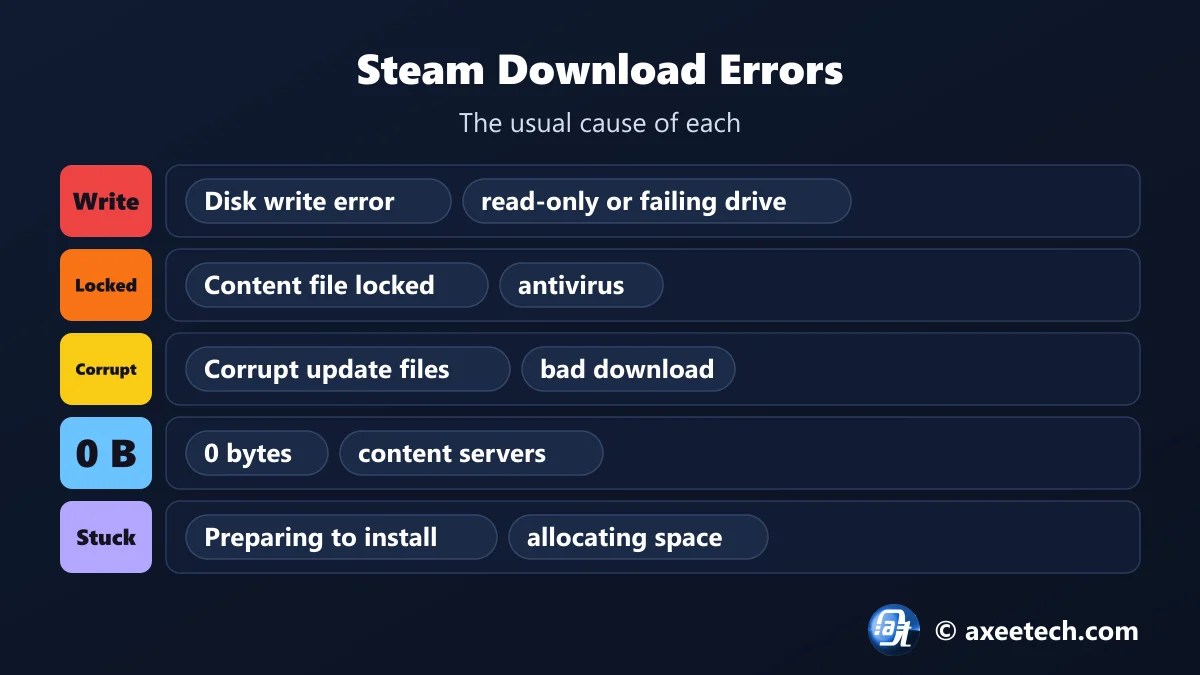
Steam Download Errors and What Causes Them
| Error | What it means | First thing to try |
|---|---|---|
| Disk write error | Steam could not write game files to the drive: a locked or read-only folder, a failing drive or antivirus. | Restart Steam and the PC. |
| Content file locked | Another program is holding a game file open, usually antivirus, or the drive has errors. | Restart the PC so nothing holds the file. |
| Stuck on preparing to install or allocating disk space | Steam is reserving space or waiting on a stuck process. | Wait five minutes on a hard drive. Allocating a very large game is slow. |
| Corrupt update files | Downloaded update data failed its check. | Clear the download cache. |
| Download stuck at 0 bytes | Steam cannot reach its content servers. | Pause and resume the download. |
| Missing file privileges | Steam does not have permission to change a file. | Restart the PC. |
| Not enough disk space | The drive does not have room for the download and the install together. | Free space on the drive. Steam needs the full size, sometimes twice for a patch. |
Commands That Fix Steam Disk and Download Errors
| Command | What it does |
|---|---|
| taskkill /f /im steam.exe | Closes Steam fully so files are released |
| start steam://flushconfig | Resets Steam’s download configuration without removing games |
| attrib -r “C:\Program Files (x86)\Steam\steamapps” /s /d | Removes the read-only flag from the library |
| chkdsk C: /f | Checks the drive for file system errors and repairs them |
| rmdir /s /q “…\steamapps\downloading” | Deletes half-downloaded update data so Steam fetches it again |
| netsh winsock reset | Resets the Windows network catalog |
| ipconfig /flushdns | Clears saved DNS lookups |
steam://flushconfig asks you to sign in again but keeps your installed games. For more repair commands, use our Windows 11 repair command generator.

Disk Write Error on an External or Second Drive
- Format matters. A Steam library must be on NTFS. exFAT and FAT32 drives throw write errors.
- Check the cable and port. A loose USB cable looks exactly like a failing drive.
- Repair the folder. Steam, Settings, Storage, the three dots, Repair Folder.
- Run chkdsk. File system errors on a second drive are a common cause.
- Use the Steam disk write error fix tool with the right drive letter so the commands match.
Content File Locked and Corrupt Update Files
Content file locked nearly always means antivirus is scanning the file Steam wants to replace. Add the whole Steam library folder to the exclusions list and restart. Corrupt update files means the downloaded data failed its check: delete the downloading folder, switch download region and verify the game. If several games corrupt on the same drive, the drive or your memory is the real problem.
Steam Disk Write Error Fix Tool Worked Example
A game on a second drive shows a disk write error. Pick the error, drive D and the SteamLibrary folder in the Steam disk write error fix tool. It lists eight steps and four commands, including attrib -r “D:\SteamLibrary\steamapps” /s /d and chkdsk D: /f. Pick an external drive and a ninth step about the cable and NTFS appears at the top.
About Steam
Steam is Valve's PC game store and launcher for Windows, macOS, Linux and the Steam Deck. It installs games into library folders, each with a steamapps folder that holds the game files and a downloading folder for updates in progress.
Most download errors come from Steam being unable to write to that folder, either because Windows or antivirus blocks it or because the drive itself has errors.
The Steam disk write error fix tool on this page is free to use, and we update it when the game changes its numbers.
Official page: Steam Support.
Related Calculators
If this Steam disk write error fix tool helped, these free tools work the same way.
- Steam error E502 L3 fix
- Windows 11 repair command generator
- Xbox error code fixer
- Discord RTC Connecting fix generator
- All free gaming and tech calculators
New this month: Valorant error code fixer, PS5 error code lookup, Xbox error code fixer, Discord RTC Connecting fix generator, Fortnite error fixer.
Frequently Asked Questions
Quick answers about Steam and the Steam disk write error fix tool.
How do I fix a Steam disk write error?
Clear the download cache, repair the library folder, remove the read-only flag from steamapps and check the drive with chkdsk.
What does content file locked mean on Steam?
Another program, usually antivirus, is holding a game file open. Exclude the Steam folder and restart.
Why is Steam stuck on preparing to install?
It is reserving disk space or waiting on a stuck process. Restart Steam, clear the download cache and check free space.
How do I fix corrupt update files on Steam?
Delete the steamapps\downloading folder, change download region and verify the game files.
Why is my Steam download at 0 bytes?
Steam cannot reach its content servers. Change the download region, clear the download cache and flush DNS.
Is the Steam disk write error fix tool free?
Yes. It runs in your browser and needs no sign-up.

Axee Davies is the founder of AxeeTech, publishing gaming guides, codes, and Windows how-tos since March 2013. A tech enthusiast for 13+ years — starting with smartphones and Android rooting — he now runs a site that puts out a new guide every day for Roblox players, traders, and Windows users. More about AxeeTech
More Games You May Like
 Project Mugetsu Codes (November 2026): Free Spins and Resets
 How to Get the Frost Relic in Sailor Piece (Roblox 2026 Guide)
 GTA 6 Preload Troubleshooter: Free Fix Finder and Best Download Time Tool (212 GB)
 Wolverine Build Planner: Free Adaptation and Best Rage Build Tool (6 Builds)
 DOOM Slaughter Mode Loadout Builder: Free Weapon and Best Shield Rune Planner (19 Arenas)
 GTA 6 Release Time Calculator: Free Unlock Time and Best New Zealand Trick Tool (Nov 19)
 Multiversal Piece Stat Build Calculator — Fruit & Trait Guide
 Cricket 26 NRR Calculator: Free Net Run Rate and Best Next-Match Planner (T20, ODI)
