Xbox Error Code Fixer: Free Console and Best PC Game Pass Fix Commands (18 Codes)
The Xbox error code fixer explains an Xbox or PC Game Pass error and gives the fix for the device you are on: menu steps for an Xbox console, or PowerShell commands for the Xbox app on Windows.
The same code can need a different fix on a console and on a PC. On a console, most errors clear with a power cycle or a reinstall. On Windows, most Game Pass errors come from one component called Gaming Services, and reinstalling it with two commands fixes them. Pick your platform and code below.
Table of Contents
How the Xbox Error Code Fixer Works
The Xbox error code fixer holds two fix lists for every type of error, one for consoles and one for Windows. Pick where you play and the code, and it shows the right list. For PC Game Pass it adds the PowerShell commands that reinstall Gaming Services and reset the Xbox app, which solves most launch and install errors.
- Pick console or PC Game Pass.
- Pick the error code.
- Read the cause.
- Follow the steps in order.
- On PC, copy the commands into PowerShell as administrator.
Xbox Error Codes and What They Mean
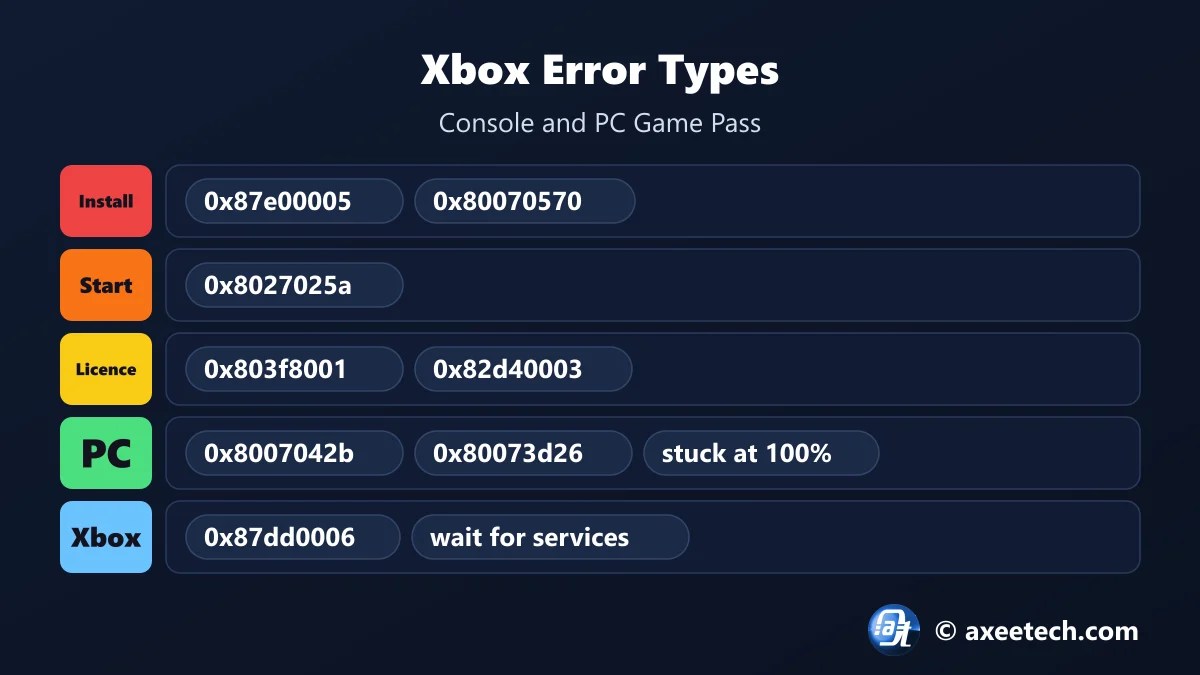
| Code | Message | Type | Cause |
|---|---|---|---|
| 0x87e00005 | Game will not start or install | Install or download | The console could not read or finish the game install, or lost the download. |
| 0x80070570 | File is corrupted or unreadable | Install or download | A game or update did not download or copy cleanly. |
| 0x8027025a | App took too long to start | Start-up timeout | The game or app timed out while loading, or sign-in services were slow. |
| 0x803f8001 | Do you own this game or app? | Licence | The licence check failed: wrong profile, disc not inserted or Home Xbox not set. |
| 0x87dd0006 | Sign-in error | Xbox services | Xbox services could not sign you in. |
| 0x87dd000f | Sign-in error | Xbox services | Xbox services are down or unreachable. |
| 0x80832003 | Temporary network problem | Network | The connection to Xbox services dropped. |
| 0x80a40008 | Cannot sign in | Network | No connection to Xbox services. |
| 0x82d40003 | Usage rights problem | Licence | The owner of the game needs to sign in. |
| 0x8b050033 | Update not available | Xbox services | A required update could not be fetched from Xbox services. |
| 0x8007042b | Game will not launch on PC | Gaming Services (PC) | Gaming Services on Windows stopped working. |
| 0x80073d26 | Gaming Services install error | Gaming Services (PC) | Gaming Services is damaged or failed to install. |
| 0x80073cf3 | Package failed to update | Gaming Services (PC) | A Store package or its dependency failed. |
| 0x00000001 | Install failed on PC | Gaming Services (PC) | The Xbox app could not install the game. |
| 0x87e10bc6 | Licence problem on PC | Store licence (PC) | The Microsoft Store could not confirm your licence. |
| 0x80070005 | Access denied | Gaming Services (PC) | Windows blocked the install or the folder. |
| 0x80070490 | Element not found | Gaming Services (PC) | A Store component is missing or damaged. |
| Stuck at 100% | Game Pass download stuck at 100 percent | Gaming Services (PC) | The install finished downloading but Gaming Services cannot complete it. |
We also have a full guide to Xbox error code 0x80832003.
PC Game Pass: Reinstall Gaming Services
| Command | What it does |
|---|---|
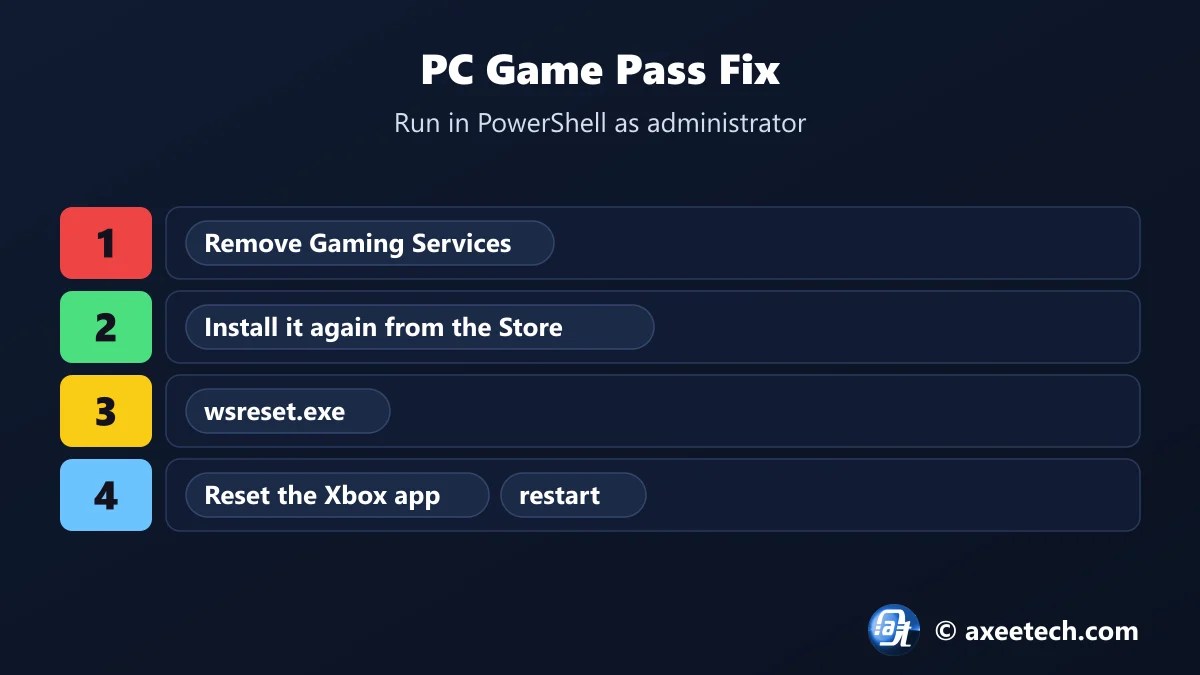
| get-appxpackage Microsoft.GamingServices | remove-AppxPackage -allusers | Removes Gaming Services for every user |
| start ms-windows-store://pdp/?productid=9MWPM2CQNLHN | Opens the Gaming Services page in the Microsoft Store so you can install it again |
| wsreset.exe | Clears the Microsoft Store cache |
| Get-AppxPackage *GamingApp* | Reset-AppxPackage | Resets the Xbox app without removing your games |
| Remove-Item …\LocalCache\* -Recurse -Force | Deletes the Xbox app local cache |
Right-click Start, choose Terminal (Admin) or Windows PowerShell (Admin), paste the first two lines, install Gaming Services from the Store page, and restart. This fixes 0x8007042b, 0x80073d26, 0x00000001 and a Game Pass download stuck at 100 percent.
Console: 0x87e00005, 0x80070570 and 0x8027025a
- 0x87e00005: the game cannot start or finish installing. Power cycle, cancel the install and reinstall.
- 0x80070570: a file is corrupted. Delete the game and download it again, on internal storage.
- 0x8027025a: the app took too long to start. Check Xbox status, power cycle and relaunch.
- 0x803f8001: the console cannot confirm you own the game. Sign in as the buyer or insert the disc.
- Use the Xbox error code fixer for the full list for your code.
A power cycle is not the same as sleep. Hold the Xbox button on the front of the console for ten seconds until it shuts down, unplug it for 30 seconds, then start it again. That clears the system cache.
Xbox Error Code Fixer Worked Example
A Game Pass game on Windows 11 refuses to launch with 0x8007042b. Set the Xbox error code fixer to PC Game Pass and it labels the error Gaming Services, lists seven steps and prints five commands, starting with the line that removes Gaming Services. Switch to console with 0x87e00005 and it shows six console steps and no commands.
About Xbox
Xbox is Microsoft's gaming platform, covering Xbox Series X and S, Xbox One, and PC Game Pass through the Xbox app on Windows. Console and PC share accounts and many error codes, but not the fixes.
On Windows, the Xbox app relies on Gaming Services and the Microsoft Store to install and license games, so most PC errors trace back to one of those two.
The Xbox error code fixer on this page is free to use, and we update it when the game changes its numbers.
Official page: Xbox Support: error code search.
Related Calculators
If this Xbox error code fixer helped, these free tools work the same way.
- Xbox error code 0x80832003 fix
- PS5 error code lookup
- GTA 6 preload troubleshooter
- Windows 11 repair command generator
- All free gaming and tech calculators
New this month: Valorant error code fixer, PS5 error code lookup, Steam disk write error fix tool, Discord RTC Connecting fix generator, Fortnite error fixer.
Frequently Asked Questions
Quick answers about Xbox and the Xbox error code fixer.
How do I fix Xbox error 0x87e00005?
Power cycle the console, cancel the stuck install in the Queue and install the game again on internal storage.
How do I fix Xbox error 0x80070570?
A file is corrupted. Uninstall the game and download it again, preferably to internal storage.
How do I fix Xbox app error 0x8007042b?
Reinstall Gaming Services with PowerShell, run wsreset.exe and restart the PC.
How do I fix Xbox error 0x8027025a?
Check the Xbox status page, power cycle the console and launch the game again.
Why is my Game Pass download stuck at 100 percent?
Gaming Services cannot finish the install. Reinstall it with the PowerShell commands and restart.
Is the Xbox error code fixer free?
Yes. It runs in your browser and needs no sign-up.

Axee Davies is the founder of AxeeTech, publishing gaming guides, codes, and Windows how-tos since March 2013. A tech enthusiast for 13+ years — starting with smartphones and Android rooting — he now runs a site that puts out a new guide every day for Roblox players, traders, and Windows users. More about AxeeTech
More Games You May Like
 FC 27 Rivals Rewards Calculator: 15 vs 30 Points
 FFXI Guide to Defeating Mamool Ja Ambuscade
 GTA 6 Preload Troubleshooter: Free Fix Finder and Best Download Time Tool (212 GB)
 Wolverine Build Planner: Free Adaptation and Best Rage Build Tool (6 Builds)
 DOOM Slaughter Mode Loadout Builder: Free Weapon and Best Shield Rune Planner (19 Arenas)
 GTA 6 Release Time Calculator: Free Unlock Time and Best New Zealand Trick Tool (Nov 19)
 Multiversal Piece Stat Build Calculator — Fruit & Trait Guide
 Cricket 26 NRR Calculator: Free Net Run Rate and Best Next-Match Planner (T20, ODI)
