The Complete Guide to Synapse X: The Former Titan of Roblox Scripting
What is Synapse X?
Synapse X was widely considered the most powerful and advanced scripting executor for Roblox. It was a Windows application that allowed users to run custom Lua scripts within Roblox games, enabling them to modify gameplay, automate tasks, and access features not normally available. It catered to a wide range of users, from beginners looking to use simple scripts to advanced developers testing complex code.
It worked by injecting into the Roblox client process, allowing it to execute scripts directly in the game’s environment. Unlike simpler tools, Synapse X was known for its deep-level integration, stability, and extensive capabilities.

Key Features of Synapse X
Synapse X was packed with features that made it the top choice for serious scripters. Its robust functionality set a high bar for what an executor could do.
- High-Performance Execution: It could run even the most complex and demanding scripts with remarkable speed and stability, minimizing crashes.
- Comprehensive Lua & Luau Support: It featured full support for standard Lua and Roblox’s Luau language, including most advanced functions.
- Powerful Debugging Library: Synapse X included an extensive and powerful built-in library for debugging and manipulation, giving scripters deep access to the game’s environment.
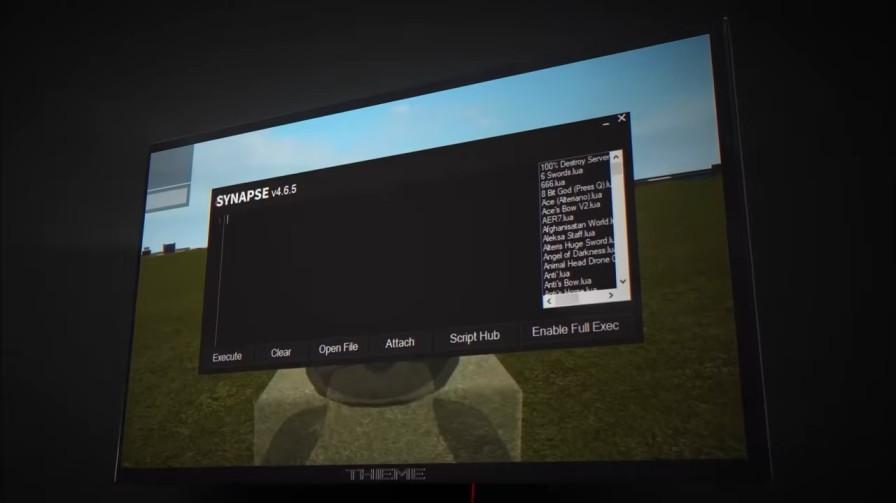
- Customizable User Interface: The application featured a clean, dark-themed UI that was both user-friendly for newcomers and efficient for power users.
- Script Hub Integration: It supported an integrated script hub, allowing users to easily discover, load, and manage scripts from a community-driven repository.
- Regular Updates: The development team was known for frequently updating the executor to ensure compatibility with the latest Roblox patches and to add new features.
How to Download & Install Synapse X
Important Note: This executor has been officially discontinued. The developers have shut down their services, and the official website is no longer accessible. Any current website or file claiming to be Synapse X is almost certainly a fake and a significant security risk. The following steps are provided for historical context only.
The historical process for downloading and installing Synapse X was:
- Visit the Official Website: Users had to purchase and download the software exclusively from the official website (synapse.to), which is now offline.
- Complete the Purchase: It was a paid tool requiring a one-time license fee. Free versions were never officially offered.
- Download the Executor: After purchase, users would download the client from their account panel on the website.
- Extract and Install: The downloaded file was typically a ZIP archive that needed to be extracted to a dedicated folder on the computer. Since it was a portable application, no traditional installation was required.
How to Use Synapse X
When it was operational, the general workflow for using Synapse X was consistent and straightforward. Here is how you would have used it:
- Launch Roblox: Start the Roblox application and join the game where you wanted to execute a script.
- Open Synapse X: Run the Synapse X executor as an Administrator. This was often required for proper injection into the Roblox process.
- Attach to Roblox: Inside the Synapse X window, you would click the “Attach” button. The tool would automatically locate and inject into the running Roblox process.
- Copy Your Script: Find a script from a trusted source, such as the built-in Script Hub or a community forum, and copy its code to your clipboard.
- Paste and Execute: Paste the script code into the main execution field in Synapse X and press the “Execute” button (or the assigned hotkey, typically CTRL + SHIFT + P). The script would then run in the game.
Common Errors & Troubleshooting

During its active period, users sometimes encountered issues. Here were some common errors and their solutions:
- “Injection Failed” Error: This was often resolved by ensuring both Roblox and Synapse X were running with Administrator privileges. Closing both applications and restarting your computer was also a common fix.
- “Script Disabled” or Crash: If a specific script caused the game to crash or simply didn’t work, the script itself was likely outdated, poorly written, or incompatible with the current game version. The solution was to find a different, updated script.
- Executor Not Attaching: If the Attach button did nothing, it usually meant Roblox had updated, and a new version of Synapse X was required. Users had to wait for the developers to release a compatible update.
- Kick/Ban from Games: Using any executor violates Roblox’s Terms of Service. Advanced anti-cheat systems in some games could detect the injection and result in a player being kicked or banned from that specific game or even from Roblox altogether.
Do Check: Best Roblox Executors for Android
Is Synapse X Safe?

This is the most critical question, and the answer has changed since its discontinuation.
- Historical Context: When downloaded from the official website, the Synapse X application itself was generally not considered malware. It was a dedicated tool with a large, paying user base. However, the act of using any third-party executor always carried the risk of account termination from Roblox.
- Current Extreme Risk: Today, Synapse X is not safe. Any download link claiming to offer Synapse X is a scam designed to distribute viruses. These fake files often contain malware, ransomware, keyloggers, or credential stealers that can compromise your Roblox account, personal data, and the security of your entire computer.
- The Verdict: You should not attempt to download or use Synapse X under any circumstances. The tool is defunct, and seeking it out will likely lead to your computer being infected with malicious software.
Do Check: Delta Executor for Roblox
Conclusion
Synapse X was once the undisputed leader in the world of Roblox executors, renowned for its raw power, reliability, and advanced feature set. It set the standard for what a scripting tool could be.
However, its era has conclusively ended. The software is officially discontinued, no longer functional with modern Roblox, and searching for it now poses a severe cybersecurity threat. For the safety of your computer and your online accounts, it is best to view Synapse X as a closed chapter in Roblox’s history.

Axee Davies is the founder of AxeeTech, publishing gaming guides, codes, and Windows how-tos since March 2013. A tech enthusiast for 13+ years — starting with smartphones and Android rooting — he now runs a site that puts out a new guide every day for Roblox players, traders, and Windows users. More about AxeeTech
More Games You May Like
 Overwatch Coins to USD Calculator: 1000 Coins = $9.99 (Best Packs 2026)
 Steam Market Fee Calculator: 15% Fee & CS2 Skin Net Payout (2026)
 Star Citizen Retribution: What It Is and Can You Buy It
 Star Citizen Ranta Dung: Where to Find It and Price
 Star Citizen Wikelo Ships: How to Get War Special Rewards
 Star Citizen Sabre Firebird: Specs, Price and Where to Buy
 Star Citizen Executive Hangar Guide: Timer and Rewards
 Star Citizen Sabre: Specs, Variants and Where to Buy