Free Online Meta Title Length Counter & Meta Description Length Tool
Title Tag and Meta Description Length Tool
Useful tools for checking the length of meta titles and descriptions, as well as a quick character counter.
Meta Title Length Checker
Enter your meta title here to check if it is between 50 – 65 characters long to keep it in accordance with Google’s maximum title length threshold.
Meta Description Length Checker
Keep meta descriptions around the recommended length of 155 characters, otherwise they will be truncated when they show up in search results.
Quick Text Counter
Paste any text here to quickly count the amount of characters, words, and sentences in real time.
Bookmark Axeetech for more such SEO tools.
Guide to Meta Title and Meta Description Length for SEO
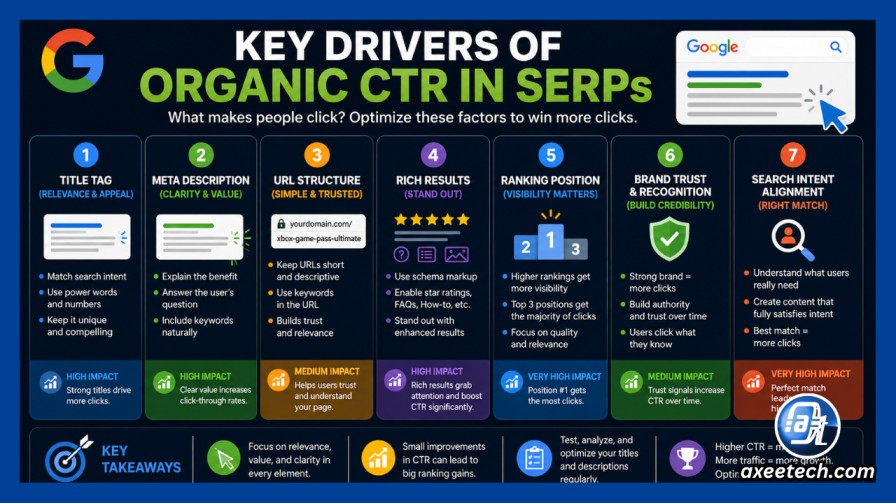
Optimizing your metadata is one of the most fundamental, high-leverage aspects of on-page search engine optimization (SEO). Your Meta Title (<title> tag) and Meta Description (<meta name="description">) serve as your website’s digital storefront in Search Engine Results Pages (SERPs).
When crafted correctly, they maximize organic click-through rates (CTR), preserve keyword relevance, and prevent Google from truncating your copy with an unsightly ellipsis (...).
Meta Title & Description Length Benchmarks: At a Glance
Search engines calculate snippet length by pixel width, not strict character counts. However, character counts serve as the most practical guideline for content writers and webmasters.
| Metadata Element | Ideal Character Count | Google SERP Pixel Limit (Desktop) | Mobile SERP Limit | Primary SEO Impact |
Meta Title (<title>) | 50 – 60 characters | ~580px – 600px | ~650px – 700px | Direct Ranking Factor + Primary CTR Driver |
| Meta Description | 120 – 155 characters | ~960px – 990px | ~680px – 750px | Indirect Ranking Factor (Influences Organic CTR) |
| H1 Headline | 20 – 70 characters | Dynamic (On-page) | Dynamic (On-page) | On-Page Context & Topic Hierarchy |
Why Pixel Width Matters More Than Character Count
While the 50–60 character rule is a reliable benchmark, Google actually renders search snippets inside a fixed visual container:

- Desktop Title Limit: ~600 pixels maximum (typically cuts off around 580px to leave room for brand appending or ellipsis).
- Desktop Description Limit: ~960 to 990 pixels (usually spans 2 lines of text).
- Mobile Description Limit: Often constrained to ~680 to 750 pixels (shorter viewport cutoff).
The Proportional Font Factor
Google displays SERP titles in Arial (a proportional font). This means characters occupy varying widths:
- Wide characters like W, M, Q, C, G consume between 13px and 17px each.
- Narrow characters like l, i, t, j, f, 1, | consume only 4px to 6px each.
Example: A 58-character title containing all-caps and wide letters (
"HOW TO MAKE MASSIVE GAINS WITH MAXIMUM EFFICIENCY WORKOUTS") will truncate at ~42 characters because it exceeds 600 pixels. Conversely, a 63-character title with narrow characters ("10 Little-Known SEO Tips for High-Traffic Technical Sites | 2026") will display completely.
How to Prevent Google from Rewriting Your Meta Titles
Google frequently replaces <title> tags in SERPs with on-page <h1> tags, subheadings (<h2>), or automated anchor text if it determines the provided title is unhelpful or mismatched.

To ensure Google displays your exact meta title, follow these core principles:
- Front-Load Your Primary Target Keyword: Place your high-intent keyword within the first 30 characters. This guarantees that even if truncation occurs on a small mobile device, your core topic remains fully visible.
- Align Your Title Tag with Your
<h1>Tag: If your<title>drastically contradicts your on-page<h1>, Google’s algorithms will often overwrite your title with the<h1>headline. Keep the semantic intent identical. - Avoid Boilerplate and Keyword Stuffing: Repeating terms (e.g., “Best Shoes, Cheap Shoes, Buy Shoes Online”) triggers Google’s automated title replacement system.
- Utilize Strategic Brand Separators: Use clean pipe symbols (
|) or en-dashes (–) before your brand name at the end of the title.
Best Practices for Writing High-CTR Meta Descriptions
Although Google has confirmed that meta descriptions are not a direct algorithmic ranking factor, they represent your primary sales copy in organic search results.

- Include Your Secondary Keywords: When a user searches for a phrase, Google bolds matching keywords in the meta description snippet, drawing the searcher’s eye directly to your result.
- Provide an Actionable Call-to-Action (CTA): Use action verbs such as Learn, Discover, Download, Calculate, Explore, or Find out how.
- Front-Load Value within 120 Characters: Because mobile SERP snippets cut off earlier than desktop, keep your most compelling selling point within the first 120 characters.
- Match Search Intent Accurately: If your description promises a step-by-step tutorial but the page is an e-commerce product checkout, users will bounce immediately, negatively impacting behavioral SEO metrics.
Frequently Asked Questions (FAQ)
What is the ideal SEO meta title length in 2026?
The optimal SEO meta title length is 50 to 60 characters (or under 580 to 600 pixels). Keeping your title within this range ensures that approximately 90% to 95% of your headline displays across both desktop and mobile search engine result pages without truncation.
What is the recommended meta description length?
The recommended meta description length is 120 to 155 characters (or under 960 pixels on desktop). For mobile-first optimization, keep your core value proposition within the first 120 characters, as mobile screen viewports truncate descriptions earlier than desktop displays.
Why does Google rewrite my meta title tag?
Google rewrites meta title tags if it detects keyword stuffing, boilerplate brand text across multiple pages, extreme title length, or a significant mismatch between the title and the searcher’s specific query. Google often replaces faulty titles with the page’s <h1> tag or prominent internal heading structure.
Does character count include spaces and punctuation?
Yes. Every character, space, punctuation mark (-, |, ,, !), number, and symbol counts toward your total character limit and occupies visual pixel width in search engine containers.
Do meta descriptions affect search engine rankings?
Meta descriptions do not directly impact algorithmic ranking positions. However, they indirectly influence SEO performance by driving your Organic Click-Through Rate (CTR). A compelling, relevant description increases clicks and signals high search intent fulfillment.
What is the difference between a title tag and an H1 tag?
A title tag (<title>) is an HTML metadata element that appears in SERPs, browser tabs, and external link previews. An H1 tag (<h1>) is the visible on-page headline that users see at the top of the webpage after clicking through.
Why do some titles truncate before reaching 60 characters?
Titles truncate before reaching 60 characters when they contain wide capital letters (such as W, M, O), excessive punctuation, or wide spacing. Search engine display algorithms measure total pixel width (up to ~600px), not raw character quantity.
How does this free Meta Title Counter tool work?
The tool analyzes your text in real time as you type or paste. It calculates the exact character count, checks length against Google’s desktop and mobile display boundaries, and alerts you whether your snippet is too short, optimal (50–65 characters for titles, 120–155 for descriptions), or at risk of truncation.
Also check Axeetech’s other tools, including: Chinese Character Counter | Sentence Counter | Run On Sentence Checker | Paragraph Counter |
Related Calculators

Axee Davies is the founder of AxeeTech, publishing gaming guides, codes, and Windows how-tos since March 2013. A tech enthusiast for 13+ years — starting with smartphones and Android rooting — he now runs a site that puts out a new guide every day for Roblox players, traders, and Windows users. More about AxeeTech
More Tools You May Like
 MW4 Pre-Load Size Calculator: SSD Space, Partition & Download Time
 MW4 Sensitivity Converter: Convert BO7, Apex & Valorant Settings + FOV & TTK
 AION 2 Stigma Calculator: Free Shard Costs & Skill Breakpoints (All 8 Classes)
 AION 2 Auction House Tax Calculator: Abyss Points & Kinah Profit
 GTA 6 PS5 Pro vs PS5: Free Frame Rate & TV Matcher for Xbox Series X/S
 GTA 6 PC Bottleneck Calculator: Free CPU, GPU & RAM Upgrade Estimator
 Windows 11 Registry Customizer: Classic Right-Click, Disable Copilot & Recall (.REG)
 Windows Partition Size Calculator: Free Exact GB/TB to MB (No 99.9 GB Bug)