The Ultimate Guide to LMS Integration: Features, Benefits, and Implementation
What is LMS Integration and Why It Matters
In today’s digital workplace, a Learning Management System (LMS) rarely operates in isolation. LMS integration is the strategic process of connecting your LMS to other software applications—like HR systems, CRMs, video conferencing tools, and single sign-on portals—to create a unified, efficient, and powerful learning ecosystem.
Think of it as building a central hub for all learning and development activities, rather than having disconnected islands of information. Without integration, administrators waste time on manual data entry, learners struggle with multiple logins and disjointed experiences, and organizations miss out on crucial data that links training to business outcomes.
Key Stat: Companies with integrated learning platforms report up to a 50% reduction in administrative overhead and a 35% increase in learner engagement (Source: Brandon Hall Group).
This guide will provide everything you need to know, from core concepts to a practical LMS integration checklist, ensuring you can build a seamless, future-proof learning environment.
Do Checkout: WhatsApp CRM

Core Concepts: Key Terminology Explained
Before diving into the “how,” it’s essential to understand the “what.” Here are the fundamental building blocks of any integration project.
API (Application Programming Interface)
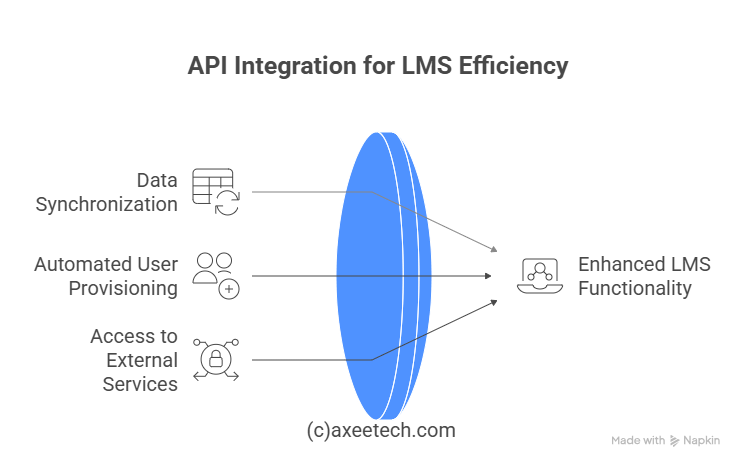
An API is a set of rules and protocols that allows different software applications to communicate with each other. It’s the messenger that takes a request from your LMS, tells another system (like your HRIS) what to do, and then returns the response. Most modern LMS integration features rely heavily on robust APIs for data synchronization and automated user provisioning.
SSO (Single Sign-On)
SSO for learning management systems is a critical authentication process. It allows users to log in to the LMS using their existing credentials from another system (e.g., their company email or Active Directory). This creates a seamless experience, eliminates password fatigue, and strengthens security.

SCORM and xAPI
These are eLearning standards that ensure content interoperability.
- SCORM (Sharable Content Object Reference Model): The long-standing standard for packaging and tracking online learning content. SCORM compliance ensures content from different authors can run on any compliant LMS.
- xAPI (Experience API): Often called the “next generation” of SCORM, xAPI allows for tracking a much wider range of learning experiences, both online and offline (e.g., reading an article, attending a workshop, performing a task). LMS SCORM and xAPI integration capabilities are non-negotiable for modern learning analytics.

LTI (Learning Tools Interoperability)
A standard primarily used in academic settings, LTI allows for secure connection of external learning tools and content (like a publisher’s textbook website or a simulation) into an LMS platform with minimal effort.
7 Key Benefits of Successful LMS Integration
Investing in a well-integrated system delivers tangible returns across the organization. Here are the primary benefits of LMS integration for employee training and business operations.
- Centralized Data and Automated Administration: Integrate your LMS with an HRIS (like Workday or SAP SuccessFactors) to automatically create user accounts, assign courses based on job role or department, and update profiles when changes occur. This eliminates manual, error-prone data entry.
- Enhanced User Experience and Adoption: A unified platform with SSO means learners have one less password to remember and can access training directly from the applications they use daily. This reduces friction and significantly boosts engagement.
- Deeper Learning Analytics and Performance Tracking: By connecting your LMS to performance management or CRM systems (like Salesforce), you can finally answer critical business questions: Did the sales training course lead to an increase in closed deals? This is the true power of learning analytics.
- Streamlined Content Delivery: Integrations with content marketplaces, video platforms (like Zoom or Vimeo), and authoring tools allow you to curate and deliver a rich blend of learning materials without constant uploading and downloading.
- Improved Compliance and Reporting: Automated user provisioning and data synchronization ensure that mandatory training is assigned to the right people on time. Reporting becomes effortless and audit-ready.
- Activation of Advanced Features: Many LMS gamification integration features or social learning tools require data from other systems to function effectively, such as pulling in achievements from a CRM to award badges.
- Significant ROI: While there are upfront integration costs, the long-term savings in administrative time, increased productivity, improved compliance, and better business outcomes deliver a compelling ROI of an integrated LMS.
Table: Benefits of LMS Integration at a Glance
| Benefit | Impact | Key Integration Enabler |
|---|---|---|
| Automated User Management | Saves 10+ admin hours/week | HRIS API Integration |
| Unified Login (SSO) | Increases learner adoption by 35%+ | Single Sign-On (SAML/OAuth) |
| Deeper Business Insights | Links training to performance data | CRM/Performance System API |
| Streamlined Content Access | Reduces content deployment time | LTI, xAPI, Video API |
Technical Integration Methods: How to Connect Your Systems
There are several ways to achieve how to integrate an LMS with other systems, each with varying levels of complexity and customization.
1. Native Integrations (Plugins/Extensions)
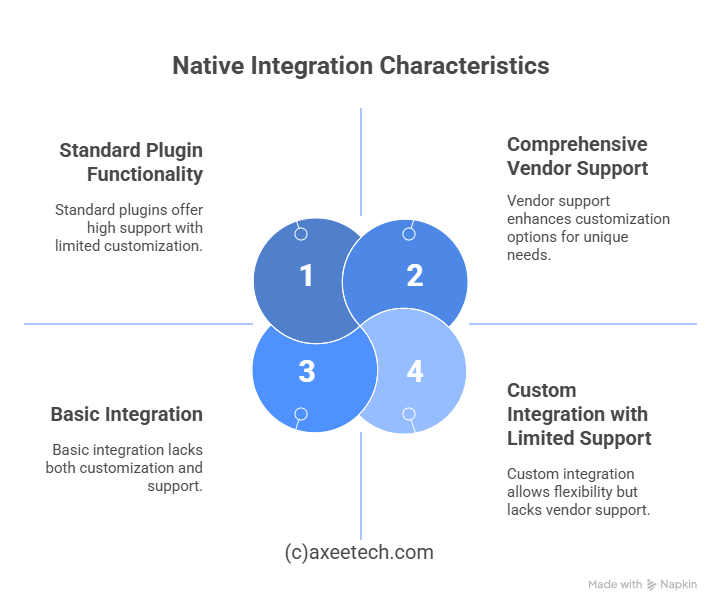
Many popular LMS platforms offer pre-built LMS plugins or LMS extensions for common software like Salesforce, Microsoft Teams, or Zoom. These are typically the easiest to implement, often requiring just a few clicks and API key authentication.
2. API-Based Integration
For more custom or complex needs, developers can use the LMS’s API to build a tailored connection. This method offers the most flexibility for custom learning platforms but requires in-house technical expertise or an implementation partner.
3. Integration Platforms as a Service (iPaaS)
Tools like Zapier, Workato, or MuleSoft act as middleware, connecting your LMS to thousands of other apps without writing extensive code. This is an excellent option for automating workflows between systems that don’t have a native connection.
The LMS Integration Checklist: A Step-by-Step Implementation Process
A successful integration project requires careful planning. Use this LMS integration checklist as your guide.
Phase 1: Pre-Integration Planning & Discovery
- Define Goals: What problems are we solving? (e.g., automate onboarding, track sales performance).
- Map Processes: Document current workflows and identify automation opportunities.
- Inventory Systems: List all software to be integrated (HRIS, CRM, SSO provider, etc.).
- Assess Technical Requirements: Check API documentation for all systems. Do you have the required LMS integration features?
- Evaluate Vendor Support: Will your LMS vendor or an implementation partner provide support?
- Establish a Budget: Estimate integration costs, including internal labor, vendor fees, and any third-party consultants.
Phase 2: Execution & Development
- Choose Your Method: Decide on native, API-based, or iPaaS integration.
- Develop and Configure: Build the integration in a sandbox/test environment.
- Test Rigorously: Test every possible data flow, error message, and user scenario. This is the most critical phase for avoiding post-launch headaches.
Phase 3: Deployment & Go-Live
- Communicate: Inform all users about the change, new login procedures (SSO), and new features.
- Deploy: Flip the switch to enable the integration in the live environment.
- Monitor Closely: Watch for errors in sync logs or user reports for the first 48-72 hours.
Phase 4: Maintenance & Optimization
- Audit Regularly: Schedule quarterly checks to ensure data is still syncing correctly.
- Gather Feedback: Ask users and administrators about their experience.
- Plan for Updates: Systems and APIs update. Have a plan for maintaining future-proofing your LMS integrations.
Must-Have Integration Features and Capabilities
When selecting an LMS or planning your project, prioritize these essential features:
- Robust RESTful API: The backbone of any modern integration.
- SSO Support (SAML 2.0, OAuth): Essential for security and user experience.
- Comprehensive Webhooks: To trigger actions in other systems based on events in the LMS (e.g., “send a Slack message when a user completes a course”).
- Support for eLearning Standards: Full SCORM and xAPI support is mandatory.
- Pre-Built Connectors: Availability of native LMS integrations with Salesforce, Workday, etc., can save significant time.
- Detailed Documentation: Clear, developer-friendly API documentation is a sign of a mature platform.
Troubleshooting Common LMS Integration Issues
Even with perfect planning, issues can arise. Here’s how to solve common problems:
- Issue: Data Not Syncing
- Solution: Check the API connection keys/tokens. Verify that the sync frequency is set correctly. Review error logs in both systems.
- Issue: SSO Login Fails
- Solution: Double-check the certificate and endpoint URLs in the identity provider (IdP) and service provider (SP) settings. Often, a single typo is the culprit.
- Issue: User Permissions Errors
- Solution: Review the user role mapping between the integrated system and the LMS. Ensure the API has permissions to write user data.
- Issue: Integration Breaks After a System Update
- Solution: This is common. Subscribe to update notifications from all your software vendors. Future-proofing your LMS involves having a regression testing plan for all integrations after any major update.
Also Read: Iorad Review
Conclusion: Key Takeaways and Next Steps
A strategically integrated LMS transforms from a simple course delivery platform into the beating heart of your organization’s learning culture. It drives efficiency, provides invaluable business intelligence, and creates a frictionless user experience (UX) that learners actually want to use.
The path to successful LMS integration requires:
- Understanding Your Needs: Focus on the business problem, not just the technology.
- Meticulous Planning: Use the checklist provided. Don’t skip the discovery phase.
- Choosing the Right Partner: Whether it’s your internal IT team, your LMS vendor, or a specialized LMS consultant, ensure they have the expertise.
- Prioritizing Security: Follow LMS integration security best practices, especially when handling sensitive employee data.
Ready to build your connected learning ecosystem? Start by auditing your current systems and defining your primary integration goal.
Frequently Asked Questions (FAQs)
What is the cost of LMS integration?
Answer: The cost of LMS integration breakdown varies wildly. Simple native integrations can be free. Mid-range custom API work can cost $5,000 – $20,000. Large-scale, enterprise-wide integrations involving multiple complex systems can exceed $50,000. Factors include the number of systems, the complexity of data flows, and whether you use internal or external developers.
What’s the difference between SCORM, xAPI, and LTI?
Answer:
- SCORM is a content standard for packaging and tracking online courses within an LMS.
- xAPI is a much broader data standard that tracks learning experiences anywhere they happen (inside and outside an LMS).
- LTI is a standard for quickly launching and connecting external learning tools into an LMS interface.
How long does a typical LMS integration take?
Answer: A simple SSO or single-point integration can take 2-4 weeks. A more complex integration with an HRIS or CRM for automated user sync can take 2-3 months from planning to full deployment.
Do Checkout: ASN-Galstar 79.1 Net Gain

Axee Davies is the founder of AxeeTech, publishing gaming guides, codes, and Windows how-tos since March 2013. A tech enthusiast for 13+ years — starting with smartphones and Android rooting — he now runs a site that puts out a new guide every day for Roblox players, traders, and Windows users. More about AxeeTech
More How to You May Like
 Top 3 Free online MBOX to PST Converters
 Common Causes of Sewage Backup That Require Emergency Sewage Cleanup Services
 Windows Resource Protection Could Not Start the Repair Service
 MEMORY_MANAGEMENT Blue Screen in Windows 10 and 11: 8 Fixes
 Night Light Not Working in Windows 11: 7 Easy Fixes
 Windows 11 Update Stuck at 46%: 7 Proven Fixes
 Start Menu Not Working in Windows 11: 7 Fixes That Work
 Repair Windows 10 From USB: 7 Step-by-Step Fixes