Dyson DP04 Error Display: Warning Triangle, Filter Alerts and Fixes
If your dyson dp04 error display is showing a warning triangle with an exclamation mark, an empty filter bar, or a screen that will not go back to normal, the machine is trying to tell you something specific; and in most cases you can clear it yourself in a few minutes.
The Dyson Pure Cool DP04 does not use numbered error codes like older machines; instead, its LCD uses symbols, and each symbol has its own meaning and its own official fix. This guide explains every symbol that can appear on the DP04’s display, what triggers it, and the exact steps Dyson recommends, from the 10-second power reset to the filter-life resets and the full factory reset.
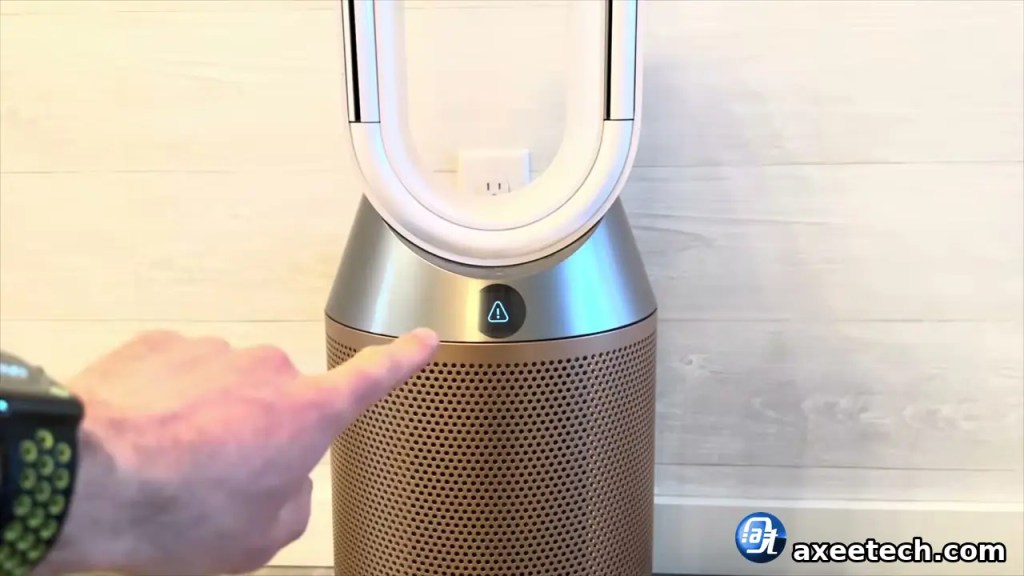
What the Dyson DP04 Error Display Symbols Mean
The warning triangle — continuous vs temporary
This is the symbol almost everyone means by a DP04 error. Dyson’s own description: the triangle with an exclamation mark means the machine “isn’t able to perform the last action requested of it.” Dyson splits it into two cases:
- Temporary triangle: it appears, then disappears on its own. The machine could not complete one action (for example, a command sent while a filter was not seated), but it is otherwise fine — keep using it.
- Continuous triangle: it stays on the display and will not clear. That is a genuine fault state, and the fixes below are for this case.
One very common non-fault trigger: the filters are not clicked fully into place. Dyson states that if the filters are not attached correctly, a triangle warning may show — reseating the filters firmly clears it.
Empty filter-life bar
Open the Information menu on the remote and scroll to the Filters screen: each filter shows a life bar. An empty bar means that filter is at the end of its life and needs replacing — on the DP04 the glass HEPA filter and the activated carbon filter are separate, with a roughly 6-month change interval at typical use. The bar does not reset itself when you fit a new filter; you have to reset the timer manually (Fix 3 below), and if you skip it, warnings keep appearing even with brand-new filters fitted.
Screens that are NOT errors
The information screens — the AQI graph, PM2.5, PM10, VOC, NO₂+, temperature, humidity and the Wi-Fi status screen — are normal data, not faults. Pollutant symbols appear simply when that pollutant is high in the room. Wi-Fi is on by default; you can toggle it by holding the machine’s Standby button for 5 seconds.
There are no “F1–F5” codes on the DP04
Some websites list letter-and-number codes (F1, F2, F3…) for Dyson purifiers. Those belong to the older LED-display generation, not the DP04. On this model, faults are communicated by the triangle — plus a hidden service menu covered in Fix 6.
Fix 1 — The Official 10-Second Power Reset
Dyson’s official first step for the triangle: switch the machine off, unplug it and leave it for 10 seconds, plug it back in and retest. This clears temporary faults. If your triangle was the temporary type, it will be gone. If it comes straight back and stays, work through the fixes in order.
Fix 2 — Reseat the Filters and Check for Blockages
Remove both filters and refit them, pressing them firmly in and up until they click fully into place — a filter sitting slightly loose is the most common innocent cause of the triangle. While they are out, check for blockages: brush dust out of the small inlet holes on the shroud (the perforated outer cover) and make sure nothing is blocking the loop amplifier’s aperture. Refit, plug in and test again.
Fix 3 — Reset the Filter-Life Timers After a Filter Change
If the display still warns after fitting new filters, the timers were never reset — each filter has its own reset, and they use different buttons:
- HEPA filter timer: with the new filter fitted and the machine plugged in, press and hold the Night mode button on the remote. The display counts down from five; when it finishes, the HEPA timer is reset.
- Carbon filter timer: press and hold the Oscillation button on the remote, through the same on-screen countdown from five.
Owners who replace both filters but reset only one timer often report a warning that stays “stuck” on one side — reset both timers, one per button.
Fix 4 — Clean the Air-Quality Sensors
Dirty sensor lenses cause wrong readings, stuck values and display complaints. Unplug the machine and vacuum the two small sensor slots beside the LCD screen with a soft brush attachment; a dry brush or a blast of cool air from a hairdryer on its cool setting also works. If your PM2.5/PM10 readings sit pinned at 999, that is the classic sign of a dirty — or failing — sensor. Also keep the machine out of direct sunlight and away from strong fluorescent light while testing, as both can disturb the sensors.
Fix 5 — Factory Reset the Machine
For display and connection faults that survive everything above, Dyson’s full reset reloads the machine: with it plugged into a stable power source, press and hold the power button on the machine and the power button on the remote at the same time. The LCD shows a countdown — keep holding until it completes and the machine resets. Afterwards, leave the purifier running for one hour so the sensors can self-calibrate.

Fix 6 — Check the Hidden Fault Codes (Advanced, Unofficial)
This generation hides a service menu behind the display: owners have documented entering it to read a Fault Codes list, where stored codes point at the failing area — in the best-documented DIY case, codes beginning 006 traced back to the main board / power control PCB. Treat this as a diagnostic, not a Dyson-published procedure: it comes from the owner community, not from Dyson’s support pages. But if your machine logs board codes, no amount of resetting will fix it — that is a parts problem (see below).

Also Worth Checking
- Use only the original power supply unit — a substitute PSU can trigger display faults.
- Software: keep the machine updated; in the MyDyson app, enable Auto-update (cog → your purifier’s settings → Software). Dyson’s own advice for screens showing wrong readings or a white screen starts with updating the software.
- Remote not responding? Its battery is a CR 2032 — a dead remote battery can make display behaviour look like a machine fault.
When It Is a Hardware Fault
If the triangle stays on after the power reset, the filter checks, the sensor clean and a factory reset — and especially if the machine is unresponsive to all input — the evidence points at the electronics, most often the main board / power control PCB. Be careful when sourcing parts: in the documented DIY repair, the board that fixed the machine was the main/power board, not the smaller display/controller board that sellers also list for these models.
The DP04 carries a 2-year Dyson warranty covering parts and labour (filters excluded), so a covered machine should go to Dyson first. Out of warranty, Dyson does not publish a flat repair price for this model: a Service Center inspects the machine and gives you a quote to accept before any work starts.
Do check our Guides section for more Error Fixing Guides like:
FAQs
What does the warning triangle on my dyson dp04 error display mean?
It means the machine could not perform the last action requested of it. If the triangle appears and then disappears, it was temporary and you can keep using the machine. If it stays on continuously, treat it as a fault: unplug the machine for 10 seconds, plug it back in and retest, then check that both filters are clicked fully into place.
How do I clear the dyson dp04 error display after changing the filter?
Fit the new filter, then reset its timer — the timers do not reset automatically. Hold the Night mode button on the remote to reset the HEPA filter timer, and hold the Oscillation button to reset the carbon filter timer; in both cases the display counts down from five. If you changed both filters, you must reset both timers.
Why is my DP04 display showing an empty bar?
The empty bar appears on the Filters information screen when a filter reaches the end of its life (about 6 months of typical use on this model). Replace that filter — HEPA and carbon are separate filters on the DP04 — and then reset its life timer with the matching remote button, or the empty bar and warnings will stay.
My DP04 shows PM readings stuck at 999. Is that an error?
It usually means the air-quality sensor cannot read properly — most often a dirty sensor lens. Unplug the machine and vacuum or brush the two sensor slots beside the LCD. If a thorough clean does not bring the readings back, the sensor itself may have failed, which is a repair job.
When should I contact Dyson about a DP04 display error?
When the triangle stays on after the 10-second power reset, filter reseating, sensor cleaning and a factory reset — or when the machine stops responding to the remote and buttons entirely. That pattern points to an electronic fault such as the main board. The machine is covered by a 2-year parts-and-labour warranty; out of warranty, Dyson inspects it and quotes before repairing.

Axee Davies is the founder of AxeeTech, publishing gaming guides, codes, and Windows how-tos since March 2013. A tech enthusiast for 13+ years — starting with smartphones and Android rooting — he now runs a site that puts out a new guide every day for Roblox players, traders, and Windows users. More about AxeeTech
More Guides You May Like
 What Is the Blue Dot Beside the Battery in Samsung Phones After the One UI 9 Update?
 ArtCraft Review: 12 Free Adobe & Microsoft Office Alternatives (Launcher + Download Guide)
 Star Citizen Retribution: What It Is and Can You Buy It
 Star Citizen Ranta Dung: Where to Find It and Price
 Star Citizen Wikelo Ships: How to Get War Special Rewards
 Star Citizen Sabre Firebird: Specs, Price and Where to Buy
 Star Citizen Executive Hangar Guide: Timer and Rewards
 Star Citizen Teach’s Ship Shop: Location and Teach’s Special